Skip to Content
Tests and ScriptsTestsAssertions

Assertions

Assertions allow you to declaratively write tests without writing any code.

Getting Started

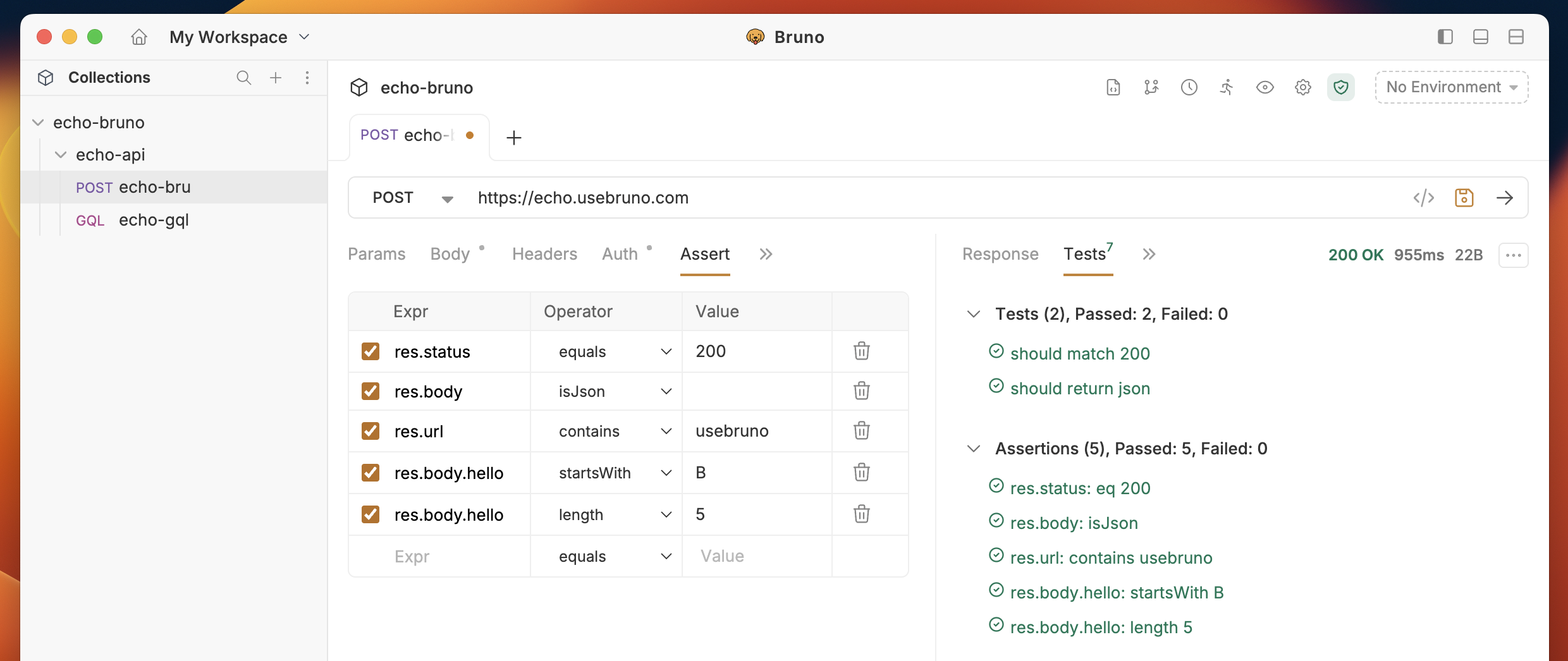
  1. Open a request and click on the Assert tab
  2. Add assertions by specifying:
    • Expression: The value to test (e.g., res.status, res.body.id)
    • Operator: The comparison operator
    • Value: The expected value

bru assertions

Common Examples

Basic Response Testing

ExpressionOperatorValue
res.statusequals200
res.body.statusequalssuccess
res.body.messagecontainscreated
res.body.idisNotEmpty

Nested Objects

{ "user": { "profile": { "name": "John", "email": "john@example.com" } } }
ExpressionOperatorValue
res.body.user.profile.nameequalsJohn
res.body.user.profile.emailcontains@example.com

Arrays

{ "users": [ { "id": 1, "name": "Alice" }, { "id": 2, "name": "Bob" } ] }
ExpressionOperatorValue
res.body.usersisNotEmpty
res.body.users[0].nameequalsAlice
res.body.users[1].idequals2

Using res() Query

For complex nested data, use the res() function:

{ "order": { "items": [ { "id": 1, "price": 29.99 }, { "id": 2, "price": 69.99 } ] } }
ExpressionOperatorValue
res('order.items[0].price')equals29.99
res('..price')isNotEmpty

Learn more about res() in Response Query docs.

Response Headers

ExpressionOperatorValue
res.headers['content-type']containsapplication/json

Response Time

ExpressionOperatorValue
res.responseTimelt1000

Available Operators

  • Comparison: equals, notEquals, gt, gte, lt, lte
  • String: contains, notContains, startsWith, endsWith, matches, notMatches
  • Type Checks: isNull, isNotEmpty, isEmpty, isDefined, isUndefined
  • Value Checks: isTruthy, isFalsy, isNumber, isString, isBoolean, isArray, isJson
  • Other: in, notIn, between, length

Advanced Testing

For complex test scenarios with custom logic, use Test Scripts with JavaScript and Chai assertions.

Last updated on