Try it out
Explore the oauth-keycloak sample collections for real-world OAuth2 flows to walk through each grant type step by step:Some APIs will require a digital certificate to establish a client’s identity.
You can add your certificate authority (CA) or client certificates to Bruno.
See Add and Manage Certificates for more
information.
Auth tab of your requests, we will automatically populate the relevant parts of the request for your chosen auth method.
Bruno currently supports the following authentication protocols:
Inherit auth
When requests share the same authentication, configure it once on the folder or collection, then set each request’s Auth type to Inherit if not set already. Bruno applies the parent auth automatically based on where the request lives:- A request inside a folder inherits from that folder (or a parent folder higher up).
- If no folder auth is set, the request inherits from the collection.
- The request’s own Auth mode stays Inherit; viewing inherited values does not change it.
See what you inherit
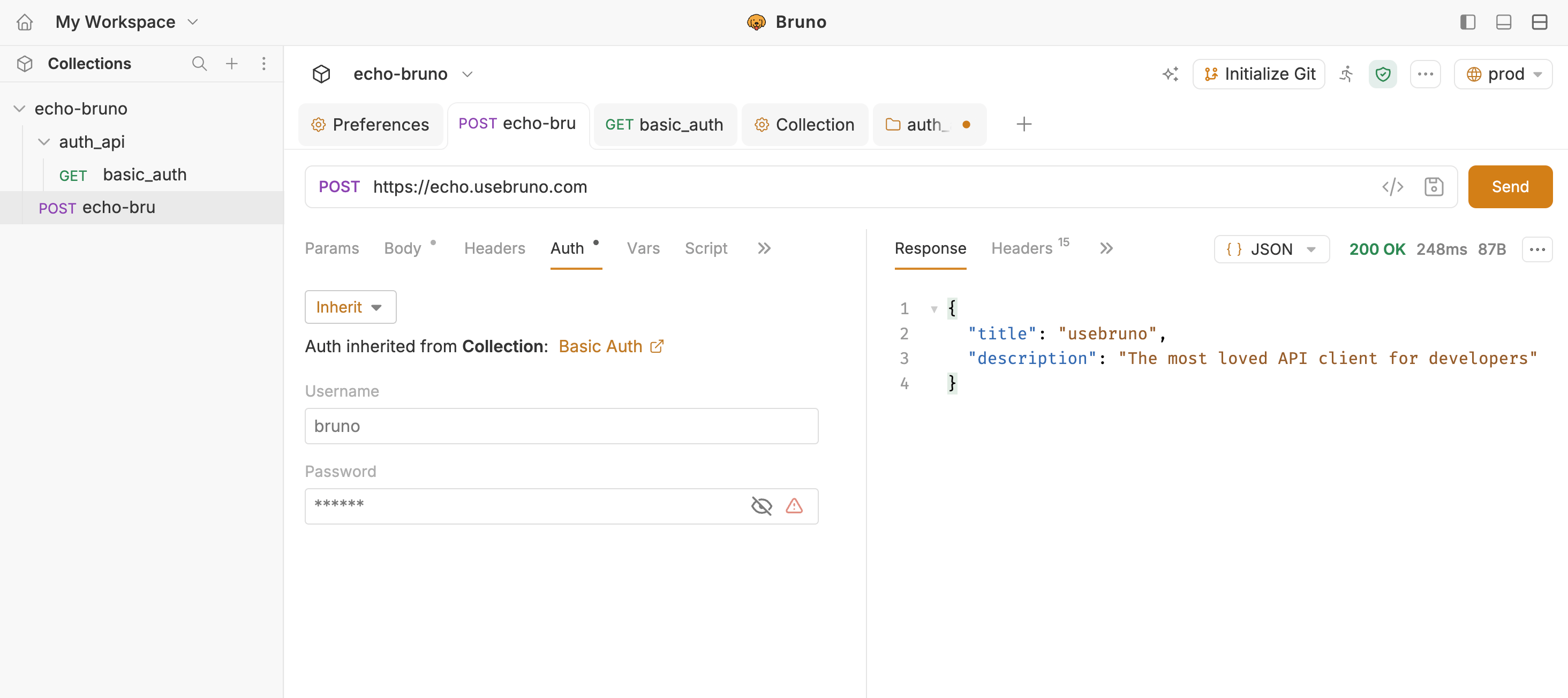
On a request set to Inherit, Bruno shows the effective auth read-only so you can see what is applied and where it comes from, without opening parent settings first.- Open the request and go to the Auth tab.
- Confirm Inherit is selected.
- Read the banner (for example Auth inherited from Collection: Basic Auth). It names the source (collection or folder) and the resolved auth type.
- Review the credentials below the banner. Fields are read-only.
- Click the auth type link (for example Basic Auth) to jump to that source’s Auth tab and edit there.