

What is Akamai EdgeGrid?
Akamai EdgeGrid is a proprietary authentication scheme used by the Akamai APIs. It signs each request with a set of credentials such as Access Token, Client Token, and Client Secret to verify the caller’s identity and protect against tampering.How to Configure
- Open a request in Bruno and go to the Auth tab.
- Select Akamai EdgeGrid from the authentication type dropdown.
- Fill in the required fields:
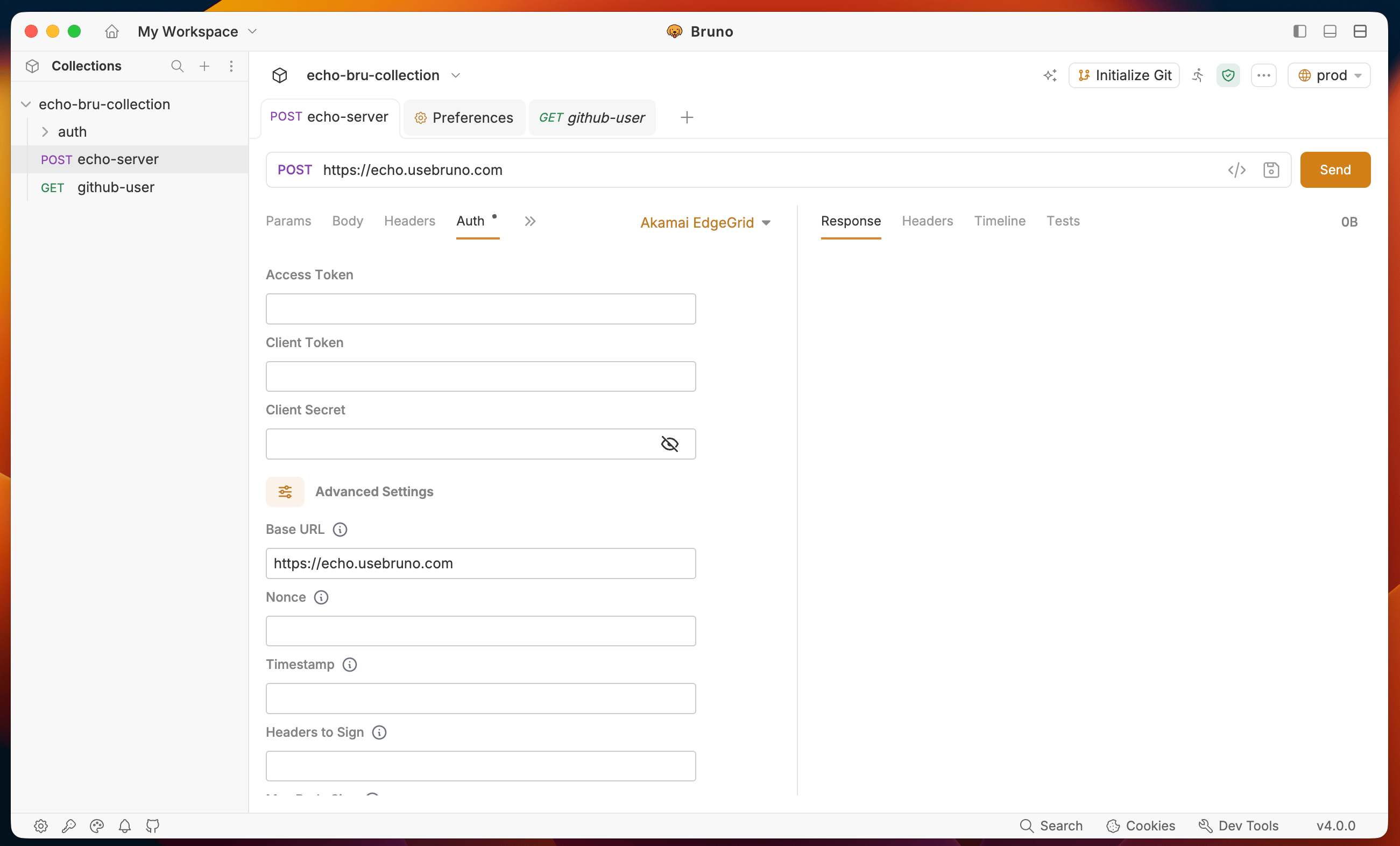
- Send your request. Bruno generates the EdgeGrid signature and attaches the required
Authorizationheader automatically.
You can also set EdgeGrid authentication at the collection level so all requests in the collection inherit it. Open Collection Settings and go to the Auth tab.
Advanced Settings
For most requests the three required fields above are all you need. Click Advanced Settings to configure optional signing parameters.Hover over the ⓘ icon next to any advanced field in the UI for a tooltip describing the field and its default behavior.