> ## Documentation Index
> Fetch the complete documentation index at: https://docs.usebruno.com/llms.txt
> Use this file to discover all available pages before exploring further.
# Creating a JS File in Bruno
Bruno provides the ability to create JavaScript tests where you can modularize common code and reuse the tests across different requests or collections.
This can be especially helpful in complex scripting scenarios where the same test will be run across multiple requests, or you're looking to leverage data that lays outside of Bruno.
## Create a New Script
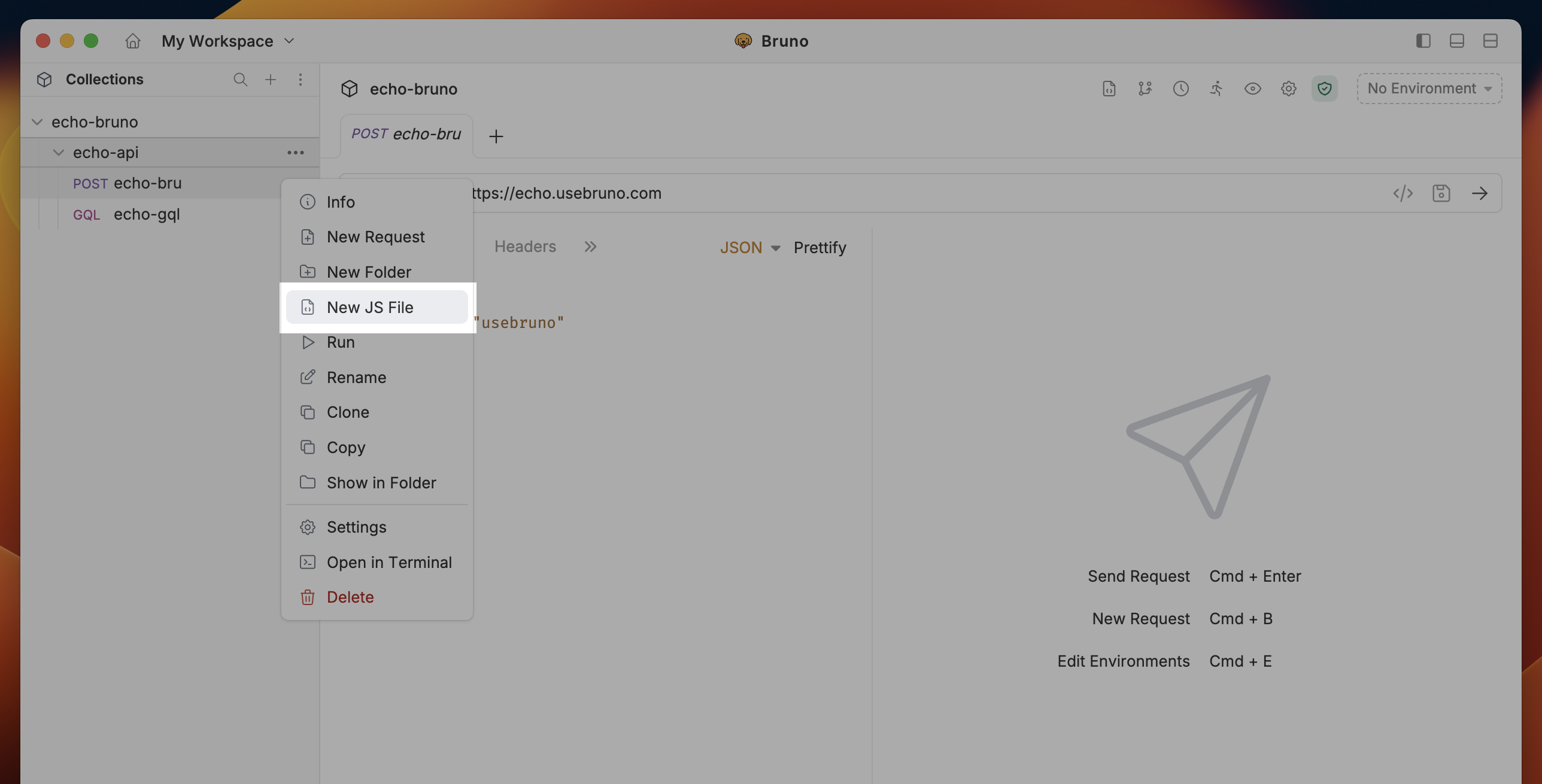
You can generate a JS File by:
1. Right clicking on any collection or folder
2. Select `New Script` from dropdown.
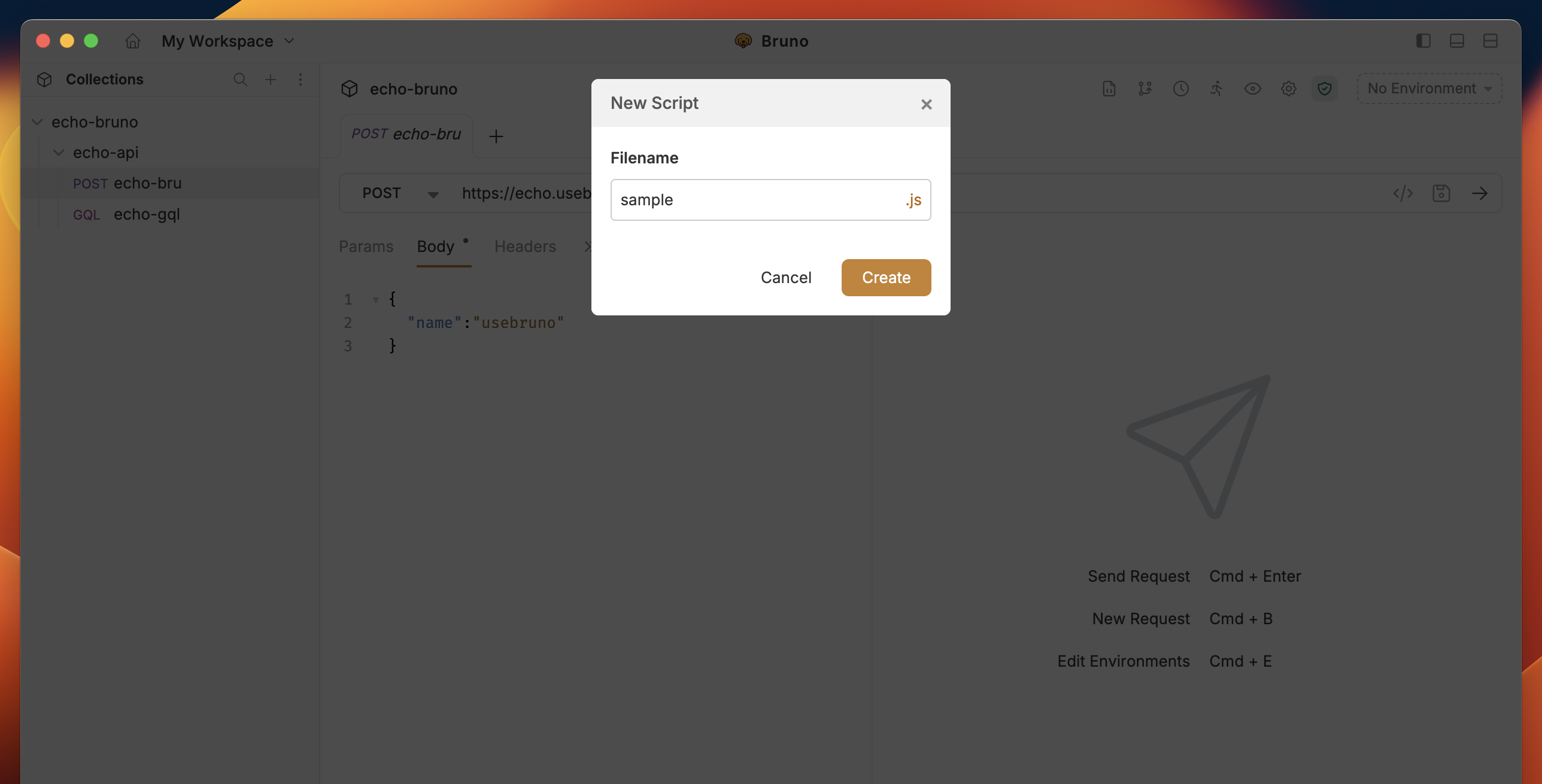
 3. Enter name and select **Create**
 ## Import the Function(s)
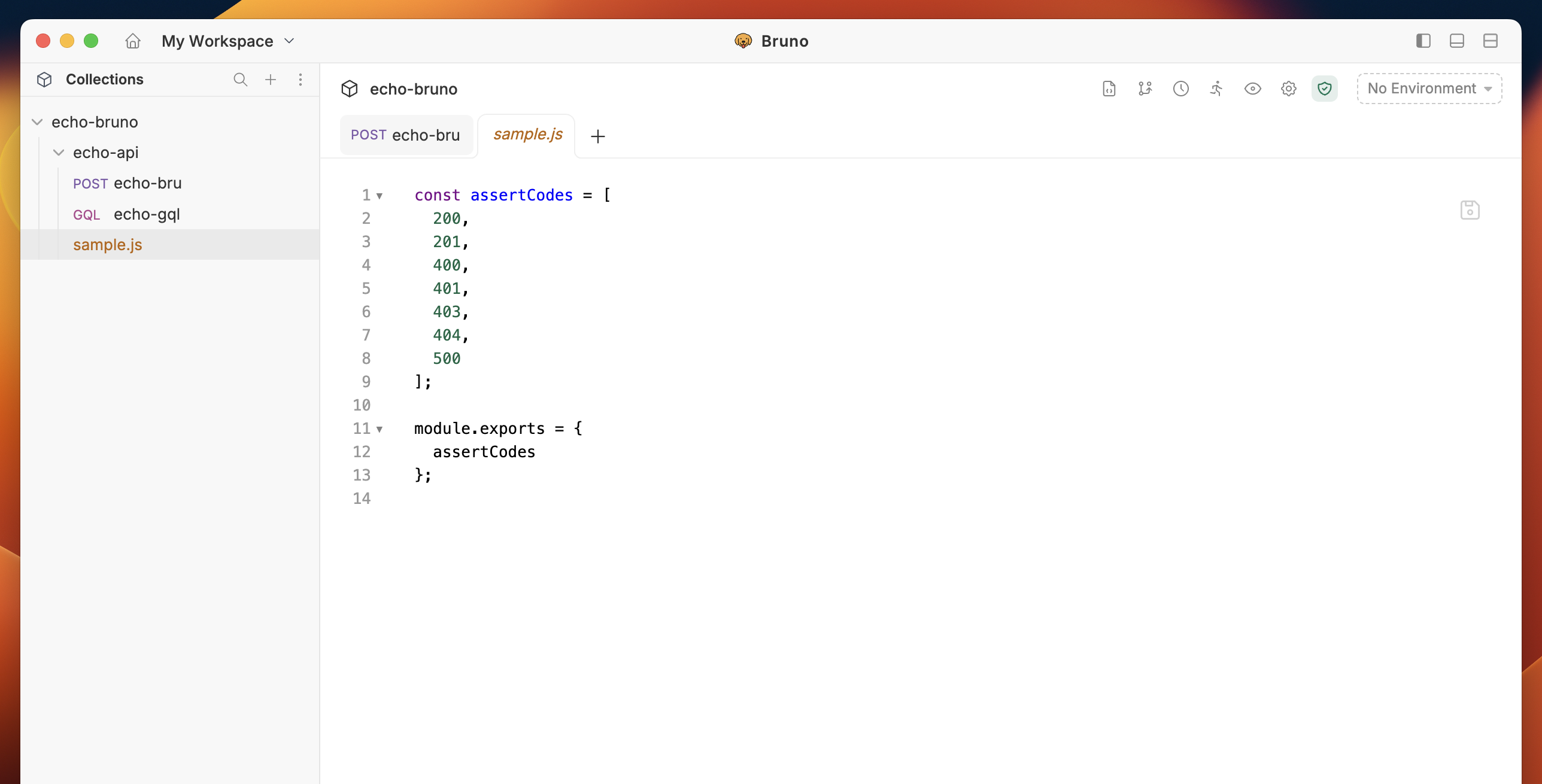
Once your JS File has been created, you can now import the functions into any `Script` tab across your resources.
## Import the Function(s)
Once your JS File has been created, you can now import the functions into any `Script` tab across your resources.
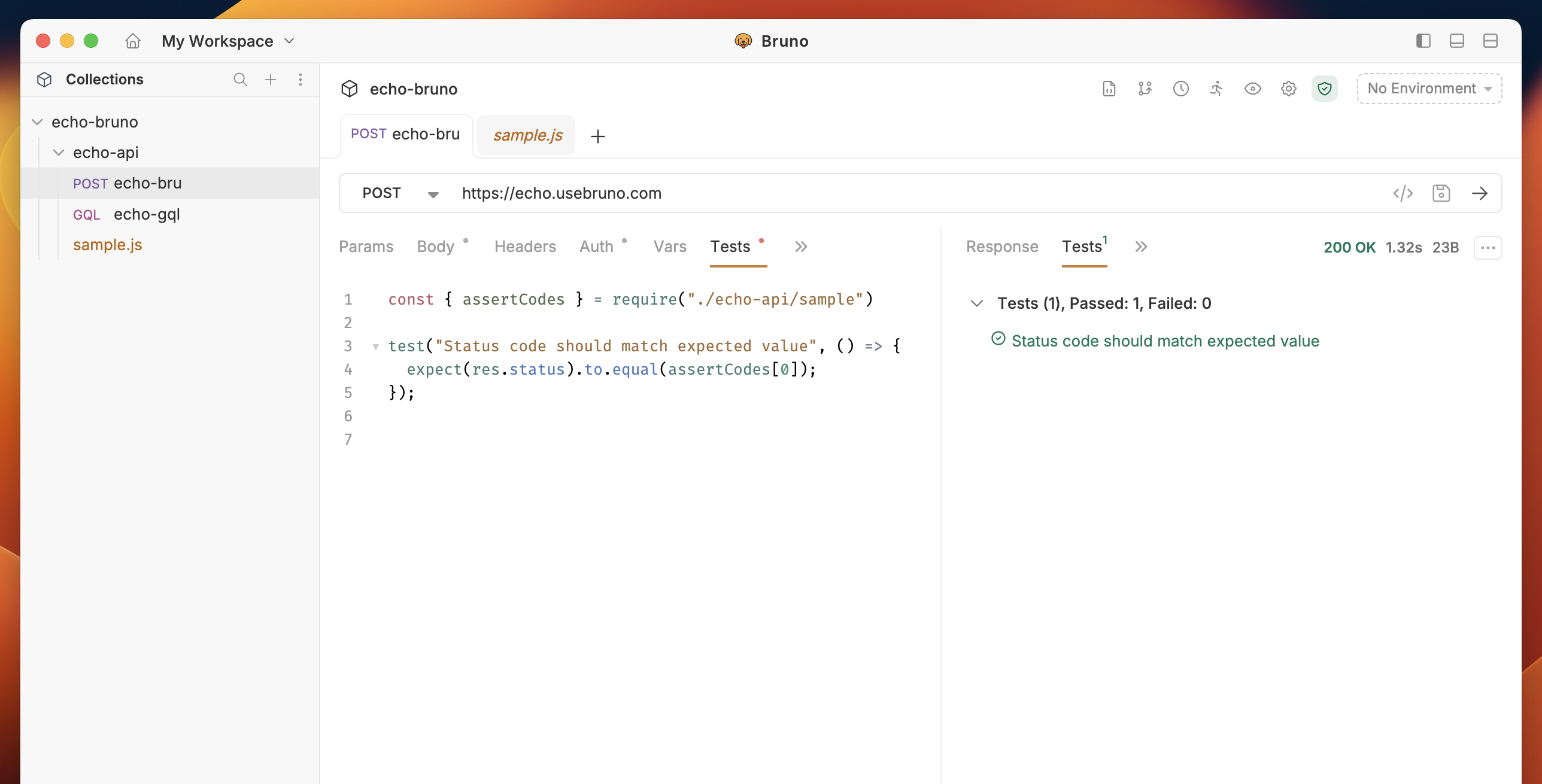 When the requests are run, you will see the script being invoked.
## Sharing Scripts Across Collections
The `additionalContextRoots` feature in Bruno allows you to share scripts across multiple collections, eliminating code duplication and promoting better code organization. This is particularly useful when you have common utility functions or shared logic that you want to use across different collections.
Make sure you're in Developer Mode to use `additionalContextRoots` feature. When using Bruno CLI (v3.0.0+), pass the `--sandbox=developer` flag.
### How to Use
#### 1. Create a Shared Scripts Directory
First, create a directory to store your shared scripts. This can be anywhere in your project structure, but it's common to place it at the root level of your project.
```bash theme={null}
project/
├── collection-a/
│ └── bruno.json
├── collection-b/
│ └── bruno.json
└── shared-scripts/
└── utils.js
```
#### 2. Configure Shared Scripts Directory
##### 2.1 Configure bruno.json
In each BRU collection's `bruno.json` file, add the `additionalContextRoots` configuration under the `scripts` object:
```json showLineNumbers theme={null}
{
"scripts": {
"additionalContextRoots": ["./path/to/shared/scripts"]
}
}
```
##### 2.2 Configure opencollection.yml
In each YML collection's `opencollection.yml` file, add the `additionalContextRoots` configuration under the `extensions.bruno.scripts` object:
```yml showLineNumbers theme={null}
extensions:
bruno:
scripts:
additionalContextRoots:
- "./path/to/shared/scripts"
```
#### 3. Create Shared Scripts
Create your shared scripts in the specified directory. For example: `shared-scripts/utils.js`:
```javascript showLineNumbers theme={null}
// shared-scripts/utils.js
const formatDate = (date) => {
return new Date(date).toISOString();
};
const generateAuthToken = (apiKey) => {
return `Bearer ${apiKey}`;
};
module.exports = {
formatDate,
generateAuthToken
};
```
#### 4. Use Shared Scripts in Collections
You can now use these shared scripts in your collection's pre-request or post-response scripts:
```javascript showLineNumbers theme={null}
// In your collection's pre-request script
const { formatDate, generateAuthToken } = require('../shared-scripts/utils.js');
// Use the shared functions
const today = formatDate(new Date());
const token = generateAuthToken('your-api-key');
// Set environment variables or request headers
bru.setEnvVar('auth_token', token);
bru.setEnvVar('current_date', today);
```
When the requests are run, you will see the script being invoked.
## Sharing Scripts Across Collections
The `additionalContextRoots` feature in Bruno allows you to share scripts across multiple collections, eliminating code duplication and promoting better code organization. This is particularly useful when you have common utility functions or shared logic that you want to use across different collections.
Make sure you're in Developer Mode to use `additionalContextRoots` feature. When using Bruno CLI (v3.0.0+), pass the `--sandbox=developer` flag.
### How to Use
#### 1. Create a Shared Scripts Directory
First, create a directory to store your shared scripts. This can be anywhere in your project structure, but it's common to place it at the root level of your project.
```bash theme={null}
project/
├── collection-a/
│ └── bruno.json
├── collection-b/
│ └── bruno.json
└── shared-scripts/
└── utils.js
```
#### 2. Configure Shared Scripts Directory
##### 2.1 Configure bruno.json
In each BRU collection's `bruno.json` file, add the `additionalContextRoots` configuration under the `scripts` object:
```json showLineNumbers theme={null}
{
"scripts": {
"additionalContextRoots": ["./path/to/shared/scripts"]
}
}
```
##### 2.2 Configure opencollection.yml
In each YML collection's `opencollection.yml` file, add the `additionalContextRoots` configuration under the `extensions.bruno.scripts` object:
```yml showLineNumbers theme={null}
extensions:
bruno:
scripts:
additionalContextRoots:
- "./path/to/shared/scripts"
```
#### 3. Create Shared Scripts
Create your shared scripts in the specified directory. For example: `shared-scripts/utils.js`:
```javascript showLineNumbers theme={null}
// shared-scripts/utils.js
const formatDate = (date) => {
return new Date(date).toISOString();
};
const generateAuthToken = (apiKey) => {
return `Bearer ${apiKey}`;
};
module.exports = {
formatDate,
generateAuthToken
};
```
#### 4. Use Shared Scripts in Collections
You can now use these shared scripts in your collection's pre-request or post-response scripts:
```javascript showLineNumbers theme={null}
// In your collection's pre-request script
const { formatDate, generateAuthToken } = require('../shared-scripts/utils.js');
// Use the shared functions
const today = formatDate(new Date());
const token = generateAuthToken('your-api-key');
// Set environment variables or request headers
bru.setEnvVar('auth_token', token);
bru.setEnvVar('current_date', today);
```