> ## Documentation Index
> Fetch the complete documentation index at: https://docs.usebruno.com/llms.txt
> Use this file to discover all available pages before exploring further.
# Configuring and Fetching Secrets
Starting from Bruno v4.0.0, secret manager configuration lives under **Environment** > **External Secrets**.
1. Open your collection environment and go to **External Secrets**.
2. Select **GCP Secrets Manager**.
3. Choose the **GCP Secrets Manager** account you configured in Preferences, or use **Add new account** to create one.
4. Add one or more rows for the projects you want to fetch from:
* **Name** - the alias used to reference secrets in Bruno (for example, `staging` or `prod`)
* **Project ID** - the GCP project to read secrets from. Bruno prefills the account’s **Default Project ID**; override it on any row to fetch from another project with the same service account.
5. Click **Fetch Secrets** in the top-right corner.
6. Bruno lists every secret in each project (latest version). Fetched secret IDs appear under **Secret Keys**.
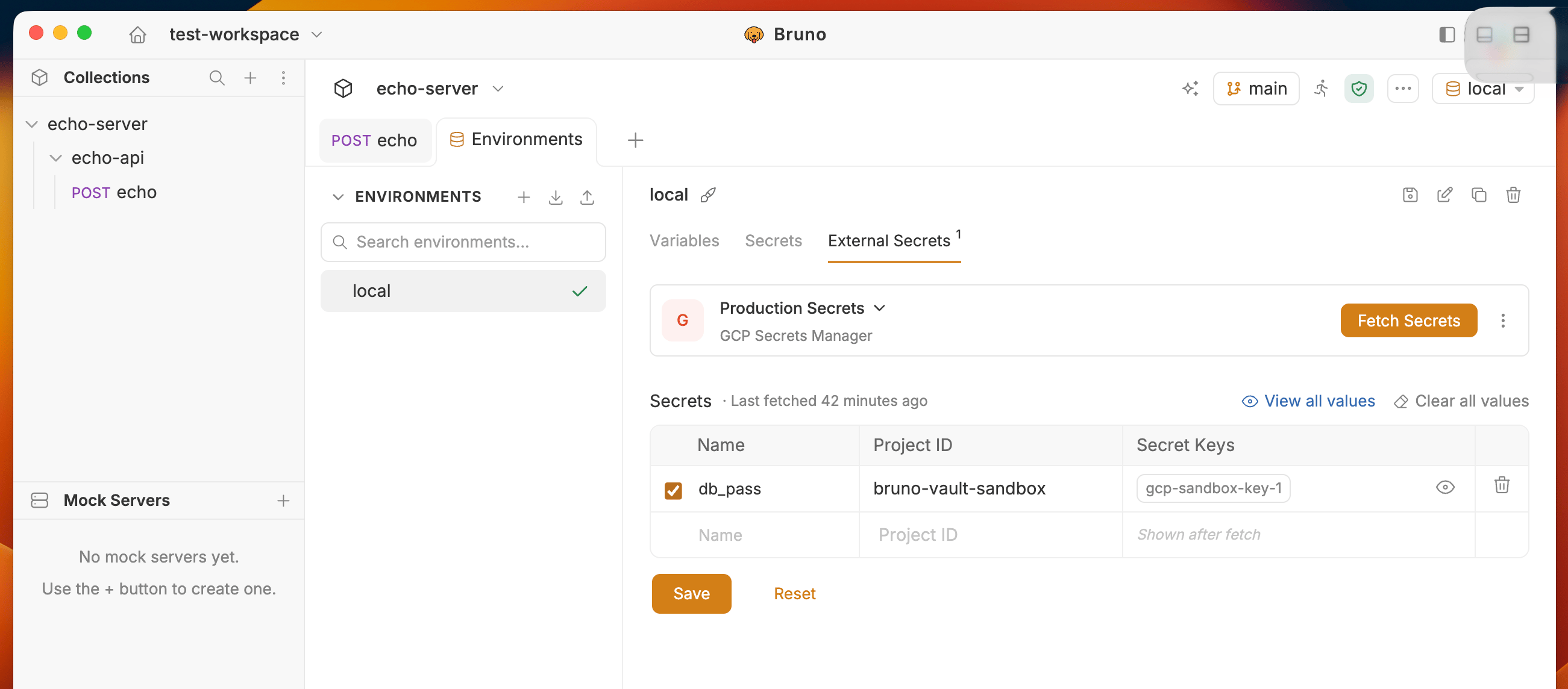 Use the three-dots menu to:
* **Edit account** - change account details
* **Remove secret manager** - remove the provider from this environment
### How project override works
One service account can reach multiple projects. Keep the default project on one row, and add another row with a different **Project ID** when you need secrets from a second project. Each row’s **Name** becomes the namespace for that project’s secrets after fetch.
### Notes
* Secrets are always fetched at their **latest** version. Per-secret version pinning is planned for future support.
* If a secret’s payload is JSON, Bruno parses it so you can access individual keys (see [Using secrets](./using-secrets)).
* Plain-string payloads are exposed under the secret ID as a single value.
Use the three-dots menu to:
* **Edit account** - change account details
* **Remove secret manager** - remove the provider from this environment
### How project override works
One service account can reach multiple projects. Keep the default project on one row, and add another row with a different **Project ID** when you need secrets from a second project. Each row’s **Name** becomes the namespace for that project’s secrets after fetch.
### Notes
* Secrets are always fetched at their **latest** version. Per-secret version pinning is planned for future support.
* If a secret’s payload is JSON, Bruno parses it so you can access individual keys (see [Using secrets](./using-secrets)).
* Plain-string payloads are exposed under the secret ID as a single value.