> ## Documentation Index
> Fetch the complete documentation index at: https://docs.usebruno.com/llms.txt
> Use this file to discover all available pages before exploring further.
# Convert WSDL to Bruno Collection
Bruno supports importing WSDL (Web Services Description Language) files to automatically generate SOAP API collections. This feature is particularly useful when working with legacy SOAP-based web services, as it eliminates the need for manual configuration of SOAP requests.
WSDL import is available in Bruno v2.14.0 and later versions.
## What Gets Generated
When you import a WSDL file, Bruno automatically:
* **Parses the WSDL structure** and extracts all available service operations
* **Creates a structured collection** with operations organized as individual `.bru` requests
* **Generates SOAP envelope templates** for each operation based on the XML schema definitions
* **Pre-configures required headers** including `Content-Type: text/xml` and `SOAPAction`
* **Includes XML schema documentation** as comments within the request body
## Import WSDL via UI
### Step 1: Access Import Collection
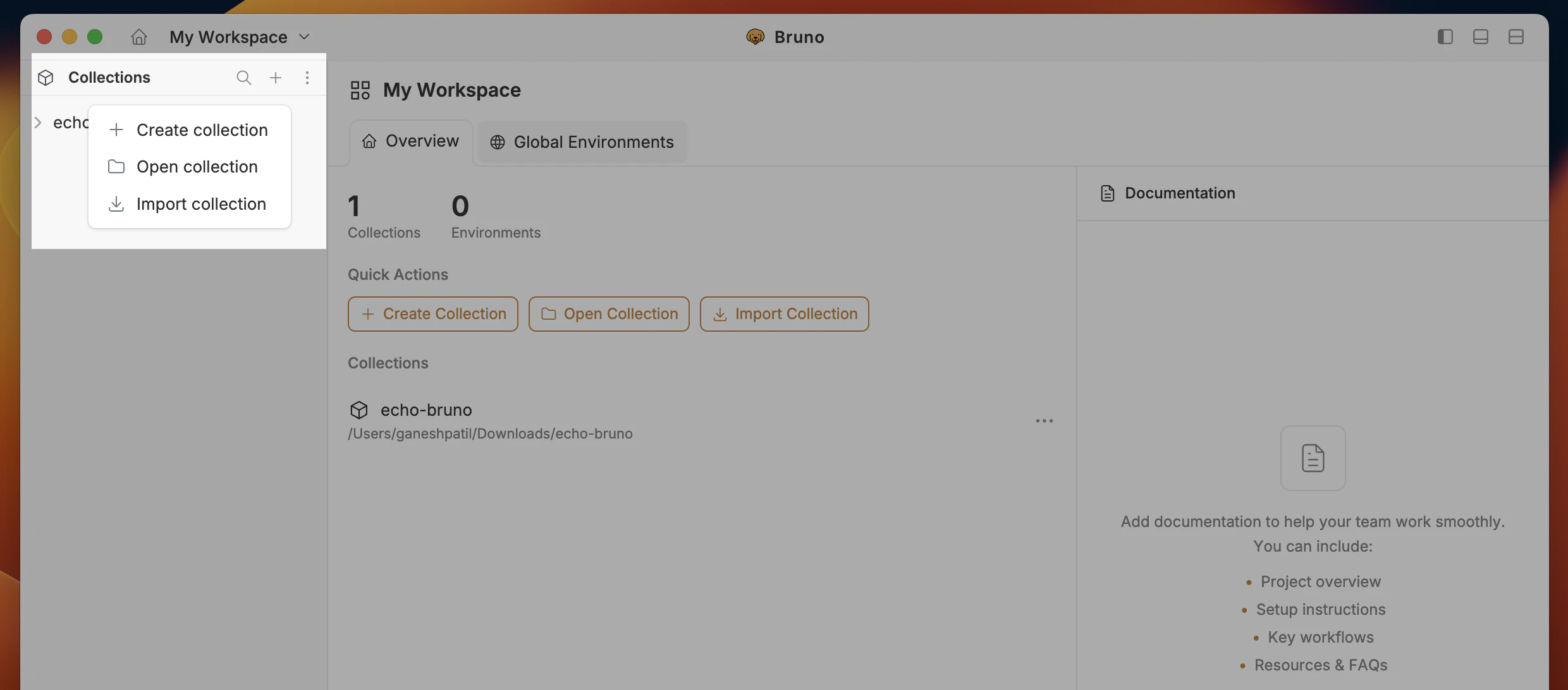
1. Click on the three-dot menu next to any collection in the sidebar
2. Select **Import Collection** from the dropdown menu
 ### Step 2: Choose WSDL Option
1. In the Import Collection dialog, select the **WSDL** option
### Step 2: Choose WSDL Option
1. In the Import Collection dialog, select the **WSDL** option
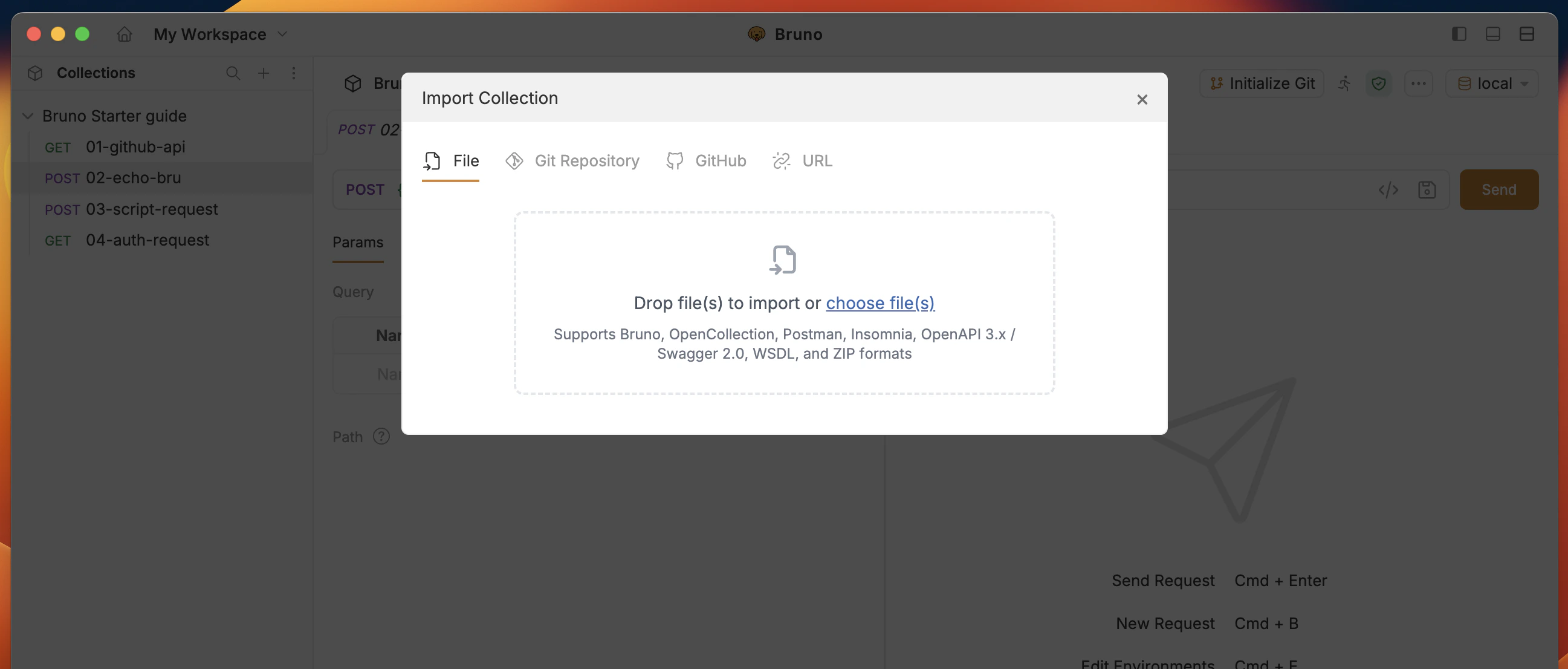 2. You can either:
* Click the upload area to browse for a local `.wsdl` file
* Drag and drop a WSDL file directly into the dialog
### Step 3: Import and Review
1. After selecting your WSDL file, Bruno will parse it and generate the collection
2. A new folder will be created containing all the SOAP operations
3. Each operation will be a separate request with a pre-configured SOAP envelope
Bruno automatically validates the WSDL structure during import. If there are any issues, you'll receive clear error messages.
## Import WSDL via CLI
You can also import WSDL files using the Bruno CLI, which is useful for automation and CI/CD workflows.
### Basic Command
```bash theme={null}
bru import wsdl path/to/service.wsdl --output ./my-collection
```
### Example
```bash theme={null}
# Import a WSDL file
bru import wsdl ./services/calculator.wsdl --output ./calculator-collection
# Import with nested directory structure
bru import wsdl ./wsdl-files/user-service.wsdl --output ./collections/soap/users
```
For detailed CLI import options and examples, see the [CLI Import Guide](/bru-cli/import).
## Programmatic Conversion
For advanced use cases, you can use the `@usebruno/converters` package to programmatically convert WSDL to Bruno collections.
### Installation
```bash theme={null}
npm install @usebruno/converters
```
### Basic Usage
```javascript theme={null}
const { wsdlToBruno } = require('@usebruno/converters');
const { readFile, writeFile } = require('fs/promises');
async function convertWsdlToBruno(wsdlFile, outputFile) {
try {
// Read the WSDL file
const wsdlContent = await readFile(wsdlFile, 'utf8');
// Convert to Bruno collection
const brunoCollection = await wsdlToBruno(wsdlContent);
// Write the output
await writeFile(outputFile, JSON.stringify(brunoCollection, null, 2));
console.log('WSDL conversion successful!');
} catch (error) {
console.error('Error during WSDL conversion:', error.message);
}
}
// Convert WSDL to Bruno
convertWsdlToBruno('path/to/service.wsdl', 'path/to/bruno-collection.json');
```
## Generated Request Structure
Each SOAP operation in the imported collection will have the following structure:
### Request Headers
```
Content-Type: text/xml; charset=utf-8
SOAPAction: "http://example.com/ServiceName/OperationName"
```
### Request Body
```xml theme={null}
value
value
```
2. You can either:
* Click the upload area to browse for a local `.wsdl` file
* Drag and drop a WSDL file directly into the dialog
### Step 3: Import and Review
1. After selecting your WSDL file, Bruno will parse it and generate the collection
2. A new folder will be created containing all the SOAP operations
3. Each operation will be a separate request with a pre-configured SOAP envelope
Bruno automatically validates the WSDL structure during import. If there are any issues, you'll receive clear error messages.
## Import WSDL via CLI
You can also import WSDL files using the Bruno CLI, which is useful for automation and CI/CD workflows.
### Basic Command
```bash theme={null}
bru import wsdl path/to/service.wsdl --output ./my-collection
```
### Example
```bash theme={null}
# Import a WSDL file
bru import wsdl ./services/calculator.wsdl --output ./calculator-collection
# Import with nested directory structure
bru import wsdl ./wsdl-files/user-service.wsdl --output ./collections/soap/users
```
For detailed CLI import options and examples, see the [CLI Import Guide](/bru-cli/import).
## Programmatic Conversion
For advanced use cases, you can use the `@usebruno/converters` package to programmatically convert WSDL to Bruno collections.
### Installation
```bash theme={null}
npm install @usebruno/converters
```
### Basic Usage
```javascript theme={null}
const { wsdlToBruno } = require('@usebruno/converters');
const { readFile, writeFile } = require('fs/promises');
async function convertWsdlToBruno(wsdlFile, outputFile) {
try {
// Read the WSDL file
const wsdlContent = await readFile(wsdlFile, 'utf8');
// Convert to Bruno collection
const brunoCollection = await wsdlToBruno(wsdlContent);
// Write the output
await writeFile(outputFile, JSON.stringify(brunoCollection, null, 2));
console.log('WSDL conversion successful!');
} catch (error) {
console.error('Error during WSDL conversion:', error.message);
}
}
// Convert WSDL to Bruno
convertWsdlToBruno('path/to/service.wsdl', 'path/to/bruno-collection.json');
```
## Generated Request Structure
Each SOAP operation in the imported collection will have the following structure:
### Request Headers
```
Content-Type: text/xml; charset=utf-8
SOAPAction: "http://example.com/ServiceName/OperationName"
```
### Request Body
```xml theme={null}
value
value
```