> ## Documentation Index
> Fetch the complete documentation index at: https://docs.usebruno.com/llms.txt
> Use this file to discover all available pages before exploring further.
# OAuth 2.0 Authentication in Bruno
export const BrunoButton = ({collectionUrl, width = 160, height = 40, className = '', style = {}}) => {
const encodedUrl = encodeURIComponent(collectionUrl);
const buttonUrl = `https://fetch.usebruno.com?url=${encodedUrl}`;
return

;
};
This document describes the OAuth 2 implementation available in Bruno. This approach simplifies authentication handling with automatic token management and flexible configuration options.
Want to learn or brush up on OAuth 2? Read more about it here: [https://blog.usebruno.com/what-is-oauth-2.0-oauth-2-explained-for-developers](https://blog.usebruno.com/what-is-oauth-2.0-oauth-2-explained-for-developers)
## Try it out
Explore the [oauth-keycloak](https://github.com/bruno-collections/oauth-keyclock) sample collections for real-world OAuth2 flows to walk through each grant type step by step:
## Overview
Bruno supports OAuth 2 authentication at collection, folder and request levels:
* **Collection Level**: Configure once and share across all requests in the collection
* **Folder Level**: Configure for a specific folder and share across all requests within that folder
* **Request Level**: Configure for individual requests, providing maximum flexibility
## Features & Improvements
1. **Simplified Configuration**: You no longer need to separately configure authorization and resource requests
2. **Automatic Token Management**: No scripting is required to set headers for the resource URL
3. **Automatic Token Injection**: Bruno automatically adds the token to request headers or parameters based on your configuration
4. **Token Data Access**: Access token data using variables: `{{$oauth2..access_token}}` within the collection
5. **Auto-fetch and Auto-refresh**: Bruno can automatically fetch new tokens when needed and refresh tokens when they expire, providing a seamless authentication experience
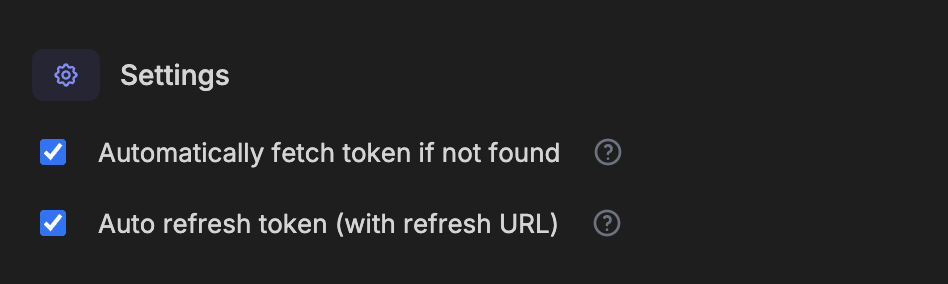
### Auto-fetch and Auto-refresh
Bruno includes two powerful token management features:
* **Auto-fetch**: Automatically fetches a new token when you try to access a protected resource and don't have a valid token
* **Auto-refresh**: Automatically refreshes your token using the refresh URL when it expires
These settings can be configured separately for each OAuth2 implementation and help streamline your API testing workflow by reducing manual token management tasks.
 ### System Browser Support
Bruno now supports OAuth 2.0 authentication using your system browser. This provides:
* **Familiar UX**: Use your default browser with saved passwords and extensions
* **Better Compatibility**: Enhanced support for OAuth providers that block embedded browsers
* **Enhanced Security**: Leverage your browser's security features
Learn more about [System Browser Support](/auth/oauth2-2.0/system-browser)
## Accessing OAuth2 Tokens in Scripts
You can access OAuth2 tokens in your scripts using the `bru.getOauth2CredentialVar()` function.
### Syntax
```javascript theme={null}
bru.getOauth2CredentialVar('$oauth2..access_token')
```
### Resetting OAuth2 Credentials
Use `bru.resetOauth2Credential(credentialId)` to programmatically clear existing OAuth2 credentials and trigger a fresh authentication cycle.
```javascript theme={null}
bru.resetOauth2Credential("my-credential-id");
```
Multiple requests can share the same `credentialId`. Resetting a credential ID will clear the credentials for **all** requests that use it.
**Example — refresh on 401 Unauthorized:**
```javascript theme={null}
if (res.getStatus() === 401) {
bru.resetOauth2Credential("my-credential-id");
console.log("OAuth2 credentials reset, fresh token will be fetched on next request");
}
```
For the full list of OAuth2 scripting APIs, see the [JavaScript API Reference](/testing/script/javascript-reference#oauth2-credentials).
### System Browser Support
Bruno now supports OAuth 2.0 authentication using your system browser. This provides:
* **Familiar UX**: Use your default browser with saved passwords and extensions
* **Better Compatibility**: Enhanced support for OAuth providers that block embedded browsers
* **Enhanced Security**: Leverage your browser's security features
Learn more about [System Browser Support](/auth/oauth2-2.0/system-browser)
## Accessing OAuth2 Tokens in Scripts
You can access OAuth2 tokens in your scripts using the `bru.getOauth2CredentialVar()` function.
### Syntax
```javascript theme={null}
bru.getOauth2CredentialVar('$oauth2..access_token')
```
### Resetting OAuth2 Credentials
Use `bru.resetOauth2Credential(credentialId)` to programmatically clear existing OAuth2 credentials and trigger a fresh authentication cycle.
```javascript theme={null}
bru.resetOauth2Credential("my-credential-id");
```
Multiple requests can share the same `credentialId`. Resetting a credential ID will clear the credentials for **all** requests that use it.
**Example — refresh on 401 Unauthorized:**
```javascript theme={null}
if (res.getStatus() === 401) {
bru.resetOauth2Credential("my-credential-id");
console.log("OAuth2 credentials reset, fresh token will be fetched on next request");
}
```
For the full list of OAuth2 scripting APIs, see the [JavaScript API Reference](/testing/script/javascript-reference#oauth2-credentials).