> ## Documentation Index
> Fetch the complete documentation index at: https://docs.usebruno.com/llms.txt
> Use this file to discover all available pages before exploring further.
# OAuth 1.0 authentication
OAuth 1.0 is a protocol that allows applications to make authenticated HTTP requests on behalf of a user without exposing their credentials. Bruno supports the full OAuth 1.0 specification ([RFC 5849](https://datatracker.ietf.org/doc/html/rfc5849)), including multiple signature methods and flexible parameter placement.
## Setting up OAuth 1.0
1. Open your request.
2. Navigate to the **Auth** tab.
3. Select **OAuth 1.0** from the dropdown list and configure the required fields.
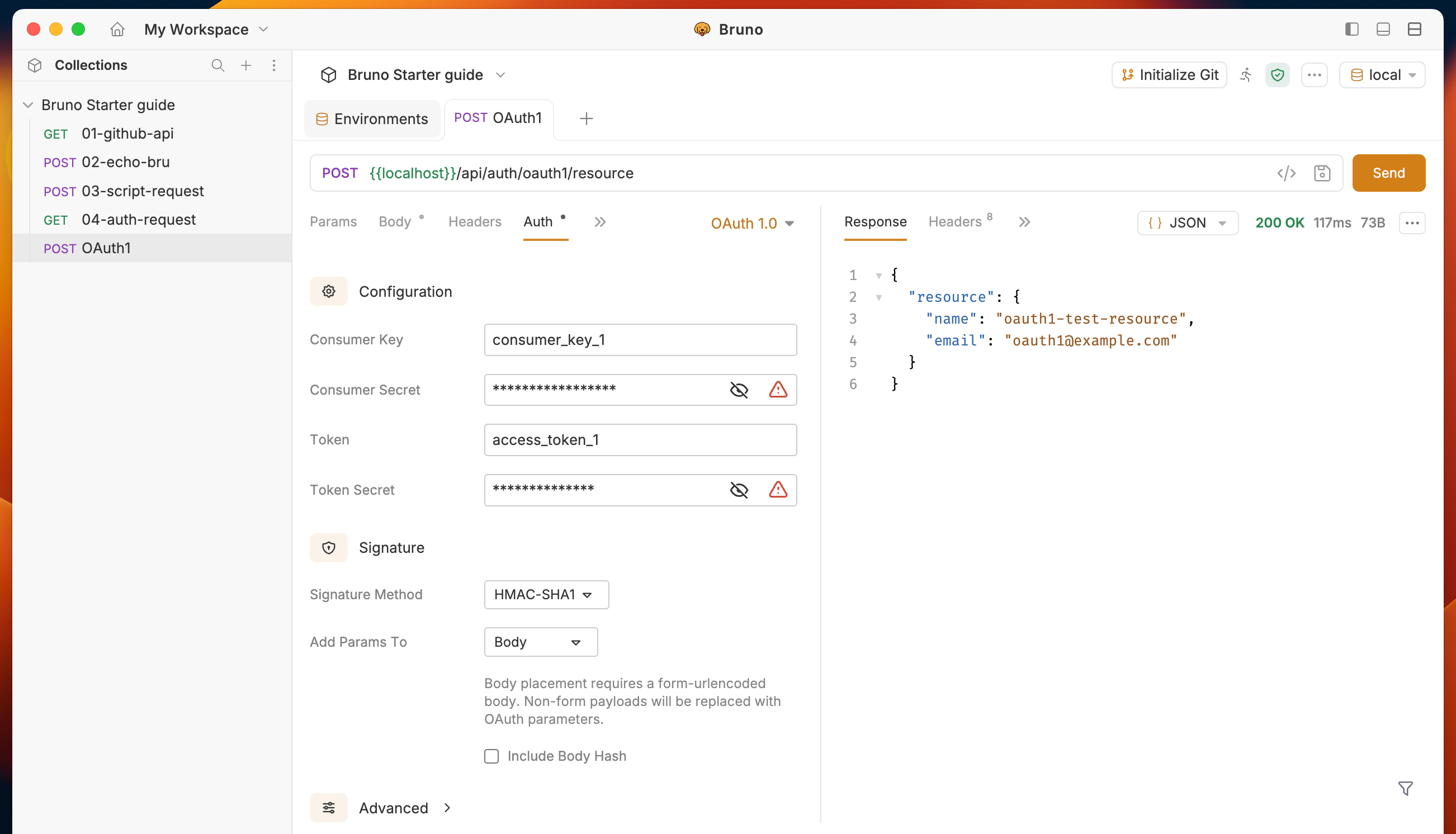 OAuth 1.0 can be configured at the **request**, **folder**, or **collection** level. When set at the collection or folder level, all child requests that use **Inherit** as their auth mode will use the shared OAuth 1.0 configuration.
## Configuration fields
### Core credentials
| Field | Description |
| ------------------- | --------------------------------------------------------------------------- |
| **Consumer Key** | The application's consumer key issued by the OAuth provider. |
| **Consumer Secret** | The application's consumer secret. Hidden when using RSA signature methods. |
| **Token** | The access token for the authenticated user. |
| **Token Secret** | The access token secret for the authenticated user. |
### Signature
| Field | Description |
| --------------------- | ---------------------------------------------------------------------------------------------------------------------------------------- |
| **Signature Method** | The algorithm used to sign requests. See [Supported signature methods](#supported-signature-methods). |
| **Private Key** | The PEM private key used for RSA signature methods. Only shown when an RSA method is selected. Can be provided inline or as a file path. |
| **Add Params To** | Where OAuth parameters are placed — `Header`, `Query Params`, or `Body`. Defaults to `Header`. |
| **Include Body Hash** | When enabled, computes and includes an `oauth_body_hash` parameter for non-form-encoded request bodies. |
### Advanced
These fields are optional and are hidden in a collapsible section.
| Field | Description |
| ---------------- | -------------------------------------------------------------------------------------------------- |
| **Callback URL** | The `oauth_callback` URL, used during the temporary credentials step of the OAuth 1.0 flow. |
| **Verifier** | The `oauth_verifier` value, used during the token credentials step. |
| **Timestamp** | Override the auto-generated `oauth_timestamp`. Leave empty to let Bruno generate it automatically. |
| **Nonce** | Override the auto-generated `oauth_nonce`. Leave empty to let Bruno generate it automatically. |
| **Version** | The `oauth_version` value. Defaults to `1.0`. |
| **Realm** | The `realm` parameter included in the Authorization header. |
OAuth 1.0 can be configured at the **request**, **folder**, or **collection** level. When set at the collection or folder level, all child requests that use **Inherit** as their auth mode will use the shared OAuth 1.0 configuration.
## Configuration fields
### Core credentials
| Field | Description |
| ------------------- | --------------------------------------------------------------------------- |
| **Consumer Key** | The application's consumer key issued by the OAuth provider. |
| **Consumer Secret** | The application's consumer secret. Hidden when using RSA signature methods. |
| **Token** | The access token for the authenticated user. |
| **Token Secret** | The access token secret for the authenticated user. |
### Signature
| Field | Description |
| --------------------- | ---------------------------------------------------------------------------------------------------------------------------------------- |
| **Signature Method** | The algorithm used to sign requests. See [Supported signature methods](#supported-signature-methods). |
| **Private Key** | The PEM private key used for RSA signature methods. Only shown when an RSA method is selected. Can be provided inline or as a file path. |
| **Add Params To** | Where OAuth parameters are placed — `Header`, `Query Params`, or `Body`. Defaults to `Header`. |
| **Include Body Hash** | When enabled, computes and includes an `oauth_body_hash` parameter for non-form-encoded request bodies. |
### Advanced
These fields are optional and are hidden in a collapsible section.
| Field | Description |
| ---------------- | -------------------------------------------------------------------------------------------------- |
| **Callback URL** | The `oauth_callback` URL, used during the temporary credentials step of the OAuth 1.0 flow. |
| **Verifier** | The `oauth_verifier` value, used during the token credentials step. |
| **Timestamp** | Override the auto-generated `oauth_timestamp`. Leave empty to let Bruno generate it automatically. |
| **Nonce** | Override the auto-generated `oauth_nonce`. Leave empty to let Bruno generate it automatically. |
| **Version** | The `oauth_version` value. Defaults to `1.0`. |
| **Realm** | The `realm` parameter included in the Authorization header. |
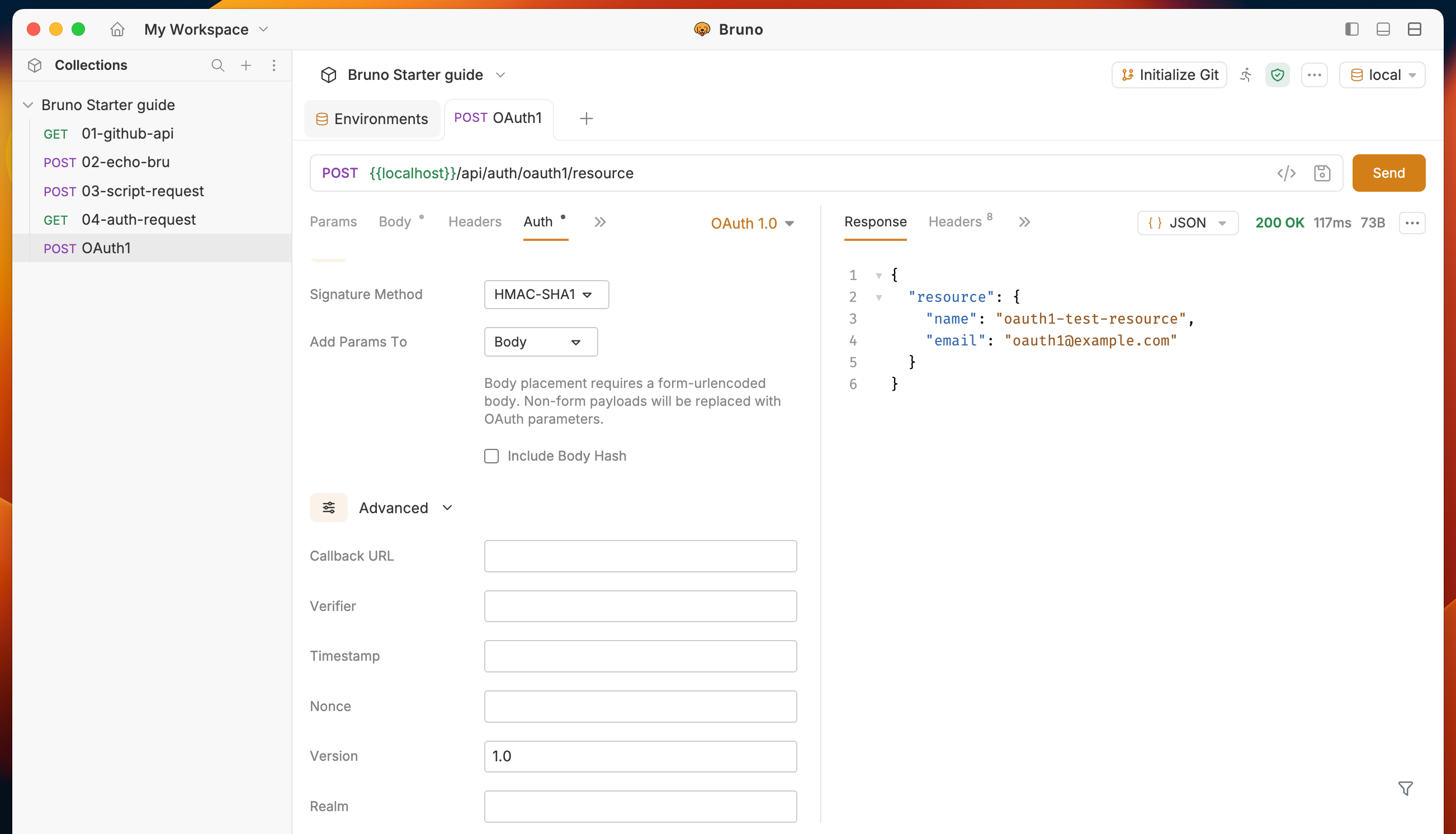 All OAuth 1.0 fields support [Bruno variables](/variables/overview). For example, you can store your consumer key in an environment variable and reference it as `{{consumerKey}}`.
## Supported signature methods
Bruno supports seven signature methods:
| Method | Type | Description |
| --------------- | ---- | -------------------------------------------------------------------- |
| **HMAC-SHA1** | HMAC | Signs using HMAC with SHA-1. This is the most common method. |
| **HMAC-SHA256** | HMAC | Signs using HMAC with SHA-256. |
| **HMAC-SHA512** | HMAC | Signs using HMAC with SHA-512. |
| **RSA-SHA1** | RSA | Signs using an RSA private key with SHA-1. |
| **RSA-SHA256** | RSA | Signs using an RSA private key with SHA-256. |
| **RSA-SHA512** | RSA | Signs using an RSA private key with SHA-512. |
| **PLAINTEXT** | None | Sends the signing key directly without hashing. Only use over HTTPS. |
All OAuth 1.0 fields support [Bruno variables](/variables/overview). For example, you can store your consumer key in an environment variable and reference it as `{{consumerKey}}`.
## Supported signature methods
Bruno supports seven signature methods:
| Method | Type | Description |
| --------------- | ---- | -------------------------------------------------------------------- |
| **HMAC-SHA1** | HMAC | Signs using HMAC with SHA-1. This is the most common method. |
| **HMAC-SHA256** | HMAC | Signs using HMAC with SHA-256. |
| **HMAC-SHA512** | HMAC | Signs using HMAC with SHA-512. |
| **RSA-SHA1** | RSA | Signs using an RSA private key with SHA-1. |
| **RSA-SHA256** | RSA | Signs using an RSA private key with SHA-256. |
| **RSA-SHA512** | RSA | Signs using an RSA private key with SHA-512. |
| **PLAINTEXT** | None | Sends the signing key directly without hashing. Only use over HTTPS. |
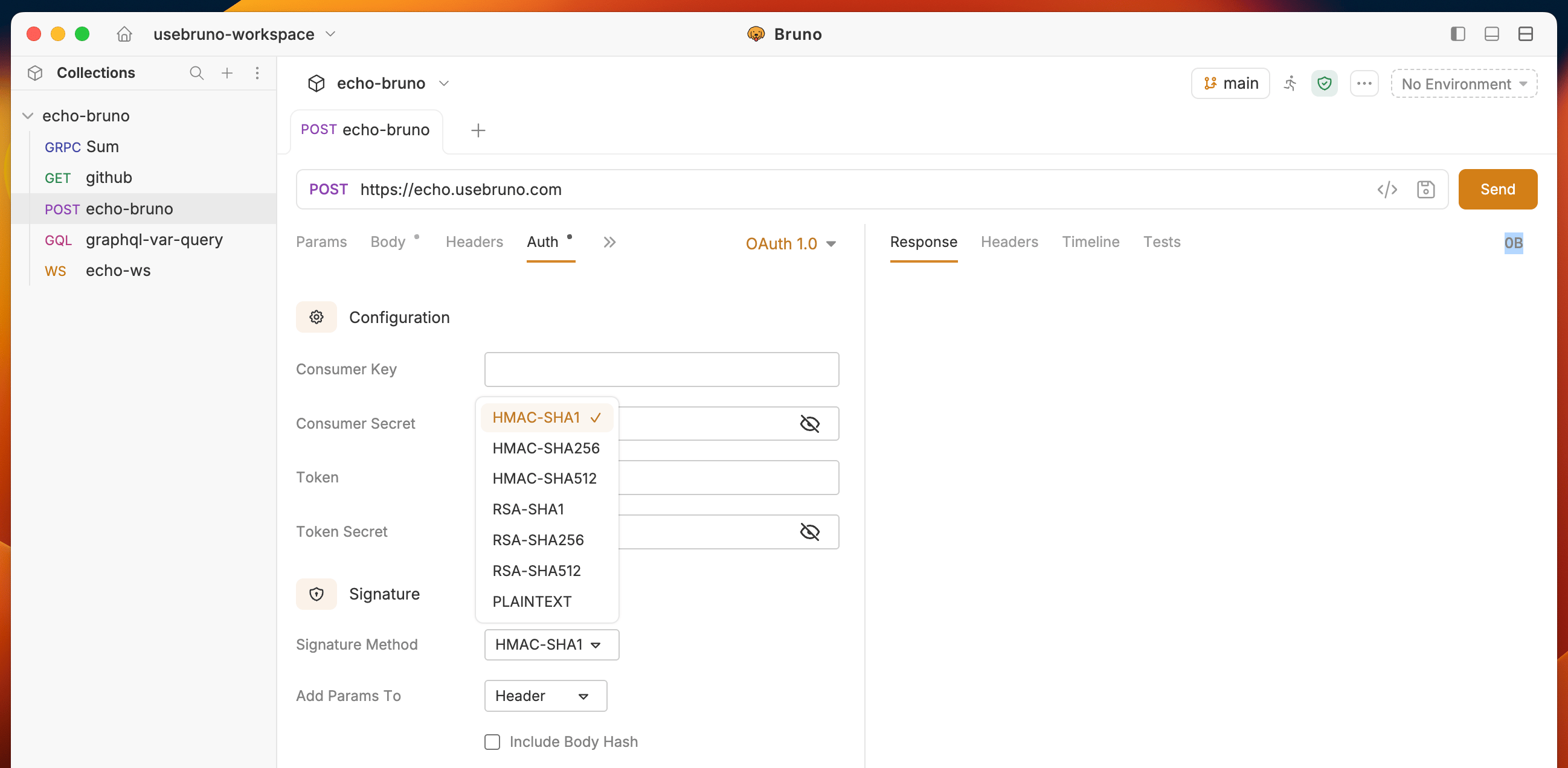 When using an RSA signature method, you must provide a PEM-formatted private key. The **Consumer Secret** field is not used with RSA methods.
## Parameter placement
You can choose where OAuth parameters are included in your requests:
* **Header** (default) — OAuth parameters are sent in the `Authorization` header, formatted per RFC 5849.
* **Query Params** — OAuth parameters are appended to the request URL as query parameters.
* **Body** — OAuth parameters are merged into the request body as `application/x-www-form-urlencoded` parameters.
Body placement requires a form-urlencoded body. If your request uses a different content type, the body will be replaced with OAuth parameters.
## CLI support
OAuth 1.0 is fully supported in the [Bruno CLI](/bru-cli/overview). When you run collections or requests via `bru run`, OAuth 1.0 authentication is applied automatically to requests that have OAuth 1.0 configured.
When using an RSA signature method, you must provide a PEM-formatted private key. The **Consumer Secret** field is not used with RSA methods.
## Parameter placement
You can choose where OAuth parameters are included in your requests:
* **Header** (default) — OAuth parameters are sent in the `Authorization` header, formatted per RFC 5849.
* **Query Params** — OAuth parameters are appended to the request URL as query parameters.
* **Body** — OAuth parameters are merged into the request body as `application/x-www-form-urlencoded` parameters.
Body placement requires a form-urlencoded body. If your request uses a different content type, the body will be replaced with OAuth parameters.
## CLI support
OAuth 1.0 is fully supported in the [Bruno CLI](/bru-cli/overview). When you run collections or requests via `bru run`, OAuth 1.0 authentication is applied automatically to requests that have OAuth 1.0 configured.