> ## Documentation Index
> Fetch the complete documentation index at: https://docs.usebruno.com/llms.txt
> Use this file to discover all available pages before exploring further.
# Configuring Apps
> Set up and activate Apps at the request level or collection level.
Bruno Apps can be configured at different levels: directly on a **request**, **collection**, and **folder**. Each level has its own entry point, editor, and activation switch.
## Request-level App
A request-level App is scoped to a single request. It can send that specific request and read its live response, assertions, and test results.
### Enabling App Mode
App Mode replaces the request/response pane with your App view.
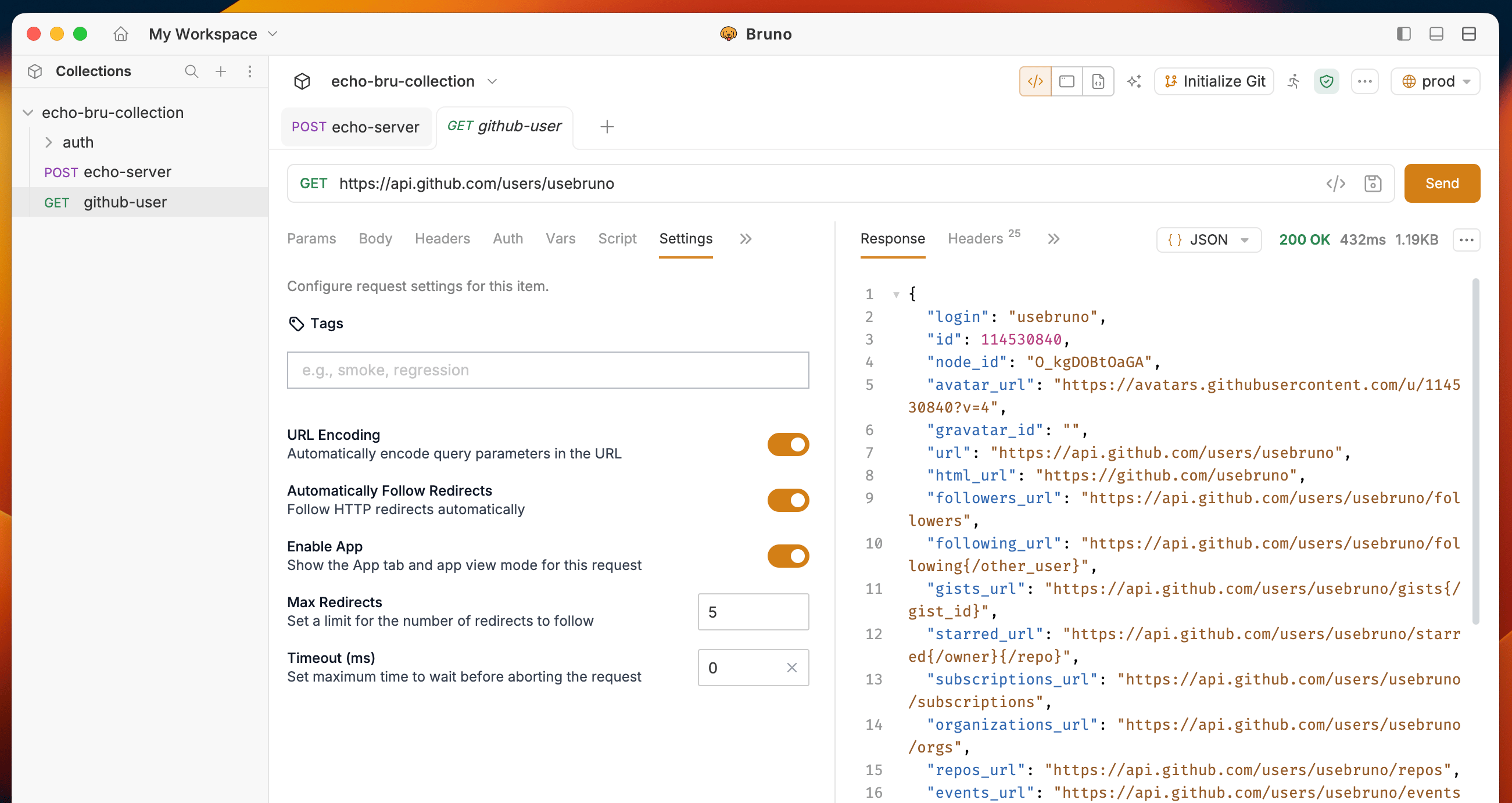
**From the Request Settings tab**
1. Open the request and go to the **Settings** tab.
2. Turn on the **Enable App** toggle.
3. The App tab becomes visible, and the App view is set as the default for this request.
 ### Adding an App to a request
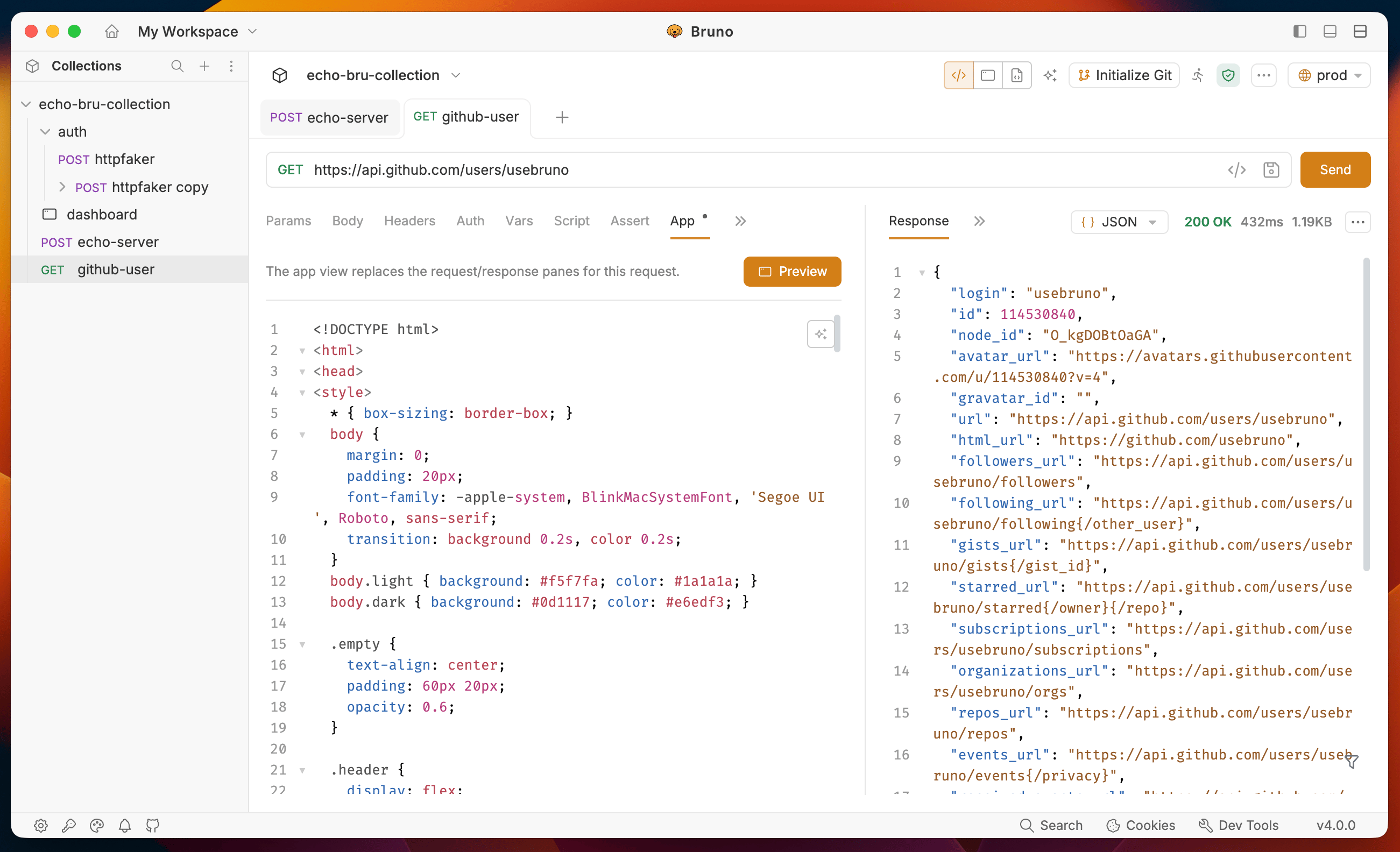
1. Open any request in Bruno.
2. Click the **App** tab in the request panel.
3. Write your HTML/JS in the code editor.
4. Click on the **Preview** button to see the live preview.
### Adding an App to a request
1. Open any request in Bruno.
2. Click the **App** tab in the request panel.
3. Write your HTML/JS in the code editor.
4. Click on the **Preview** button to see the live preview.
 ### What the App can do at request level
| Capability | How |
| -------------------------- | --------------------------------------------------------------- |
| Send the parent request | `bru.ctx.submitRequest()` |
| Send with custom variables | `bru.ctx.submitRequest({ runtimeVariables: { key: 'value' } })` |
| Read the latest response | `bru.ctx.http.response` (inside `onInit` / `onResponseChange`) |
| React to new responses | `bru.ctx.http.onResponseChange = (res) => { … }` |
| Read assertion results | `bru.ctx.assertions` |
| Read test results | `bru.ctx.tests` |
## Collection-level App
A collection-level App is attached to an entire collection or folder. It opens as its own tab and can list and run any request inside the collection.
### Adding an App to a collection
1. In the collection sidebar, right-click a **collection** or **folder** and choose **New App** from the context menu.
### What the App can do at request level
| Capability | How |
| -------------------------- | --------------------------------------------------------------- |
| Send the parent request | `bru.ctx.submitRequest()` |
| Send with custom variables | `bru.ctx.submitRequest({ runtimeVariables: { key: 'value' } })` |
| Read the latest response | `bru.ctx.http.response` (inside `onInit` / `onResponseChange`) |
| React to new responses | `bru.ctx.http.onResponseChange = (res) => { … }` |
| Read assertion results | `bru.ctx.assertions` |
| Read test results | `bru.ctx.tests` |
## Collection-level App
A collection-level App is attached to an entire collection or folder. It opens as its own tab and can list and run any request inside the collection.
### Adding an App to a collection
1. In the collection sidebar, right-click a **collection** or **folder** and choose **New App** from the context menu.
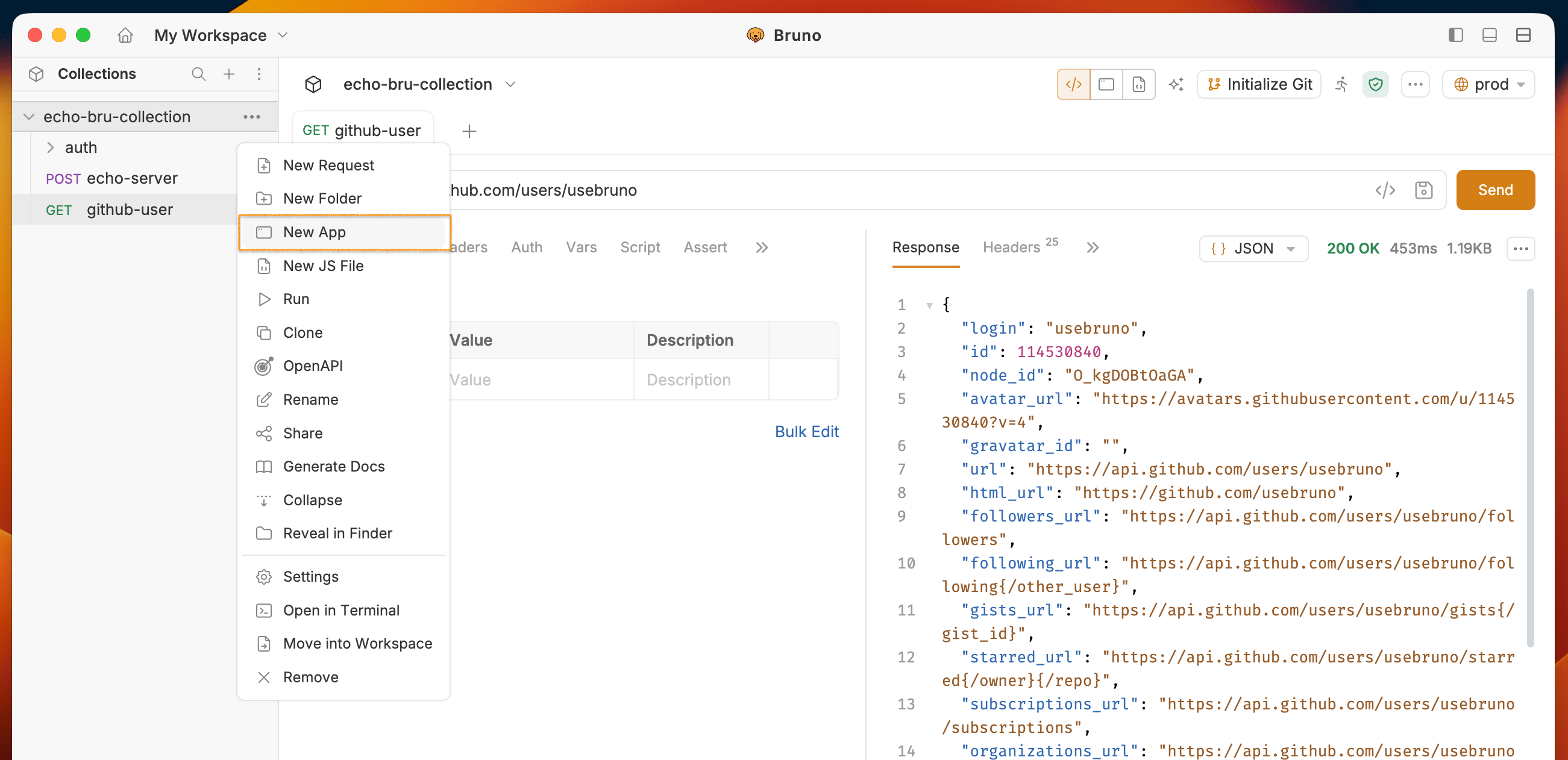 2. A dialog box will open, enter a name for the **App** and click on the **Create** button.
3. Write your HTML/JS in the code editor.
4. Click on the **Preview** button to see the live preview.
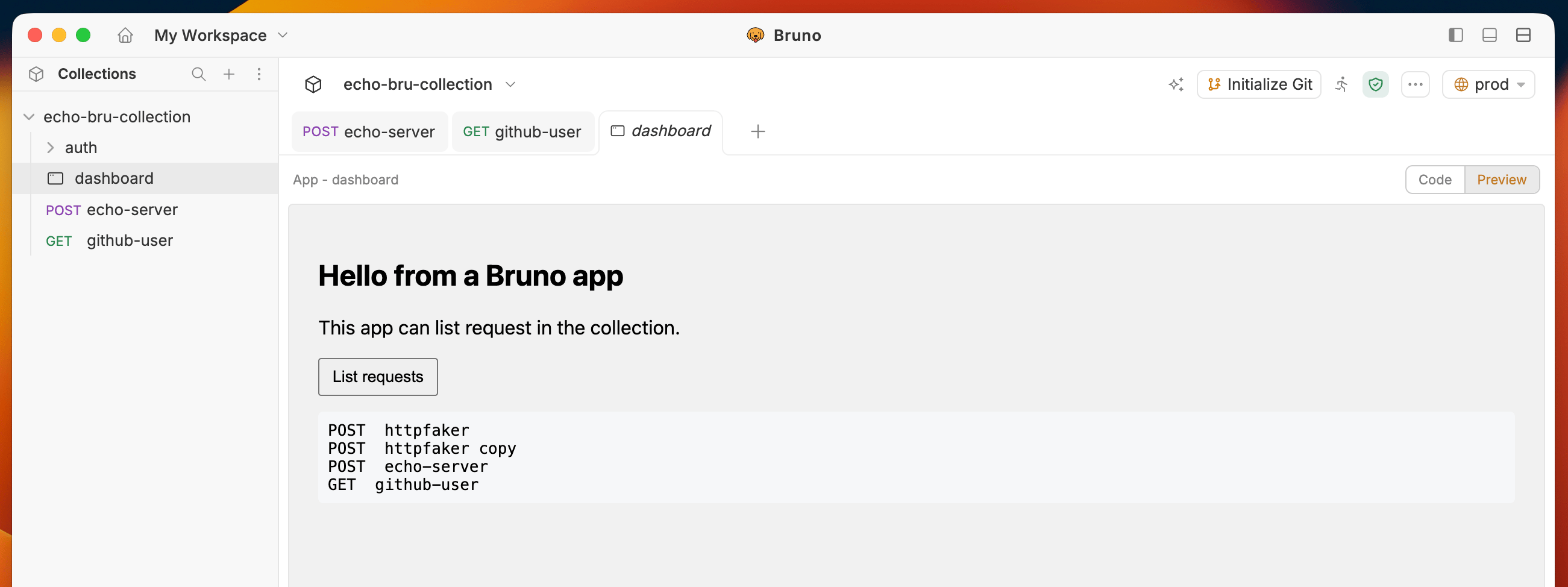
When you create an App from a collection or folder, the default code provided lists all requests in that collection.
2. A dialog box will open, enter a name for the **App** and click on the **Create** button.
3. Write your HTML/JS in the code editor.
4. Click on the **Preview** button to see the live preview.
When you create an App from a collection or folder, the default code provided lists all requests in that collection.
 ### What the App can do at collection level
| Capability | How |
| --------------------------- | ---------------------------------------------------------------------- |
| List all requests | `bru.ctx.listRequests()` — returns `RequestSummary[]` |
| Run a specific request | `bru.ctx.runRequest(pathname)` |
| Run with custom variables | `bru.ctx.runRequest(pathname, { runtimeVariables: { key: 'value' } })` |
| Read collection metadata | `bru.ctx.collection.name`, `bru.ctx.collection.pathname` |
| Read all resolved variables | `bru.ctx.variables.resolved` (env + collection + runtime, merged) |
| Persist a runtime variable | `bru.ctx.variables.runtime.set(name, value)` |
Collection-level Apps do **not** have access to `bru.ctx.http`, `bru.ctx.submitRequest`, `bru.ctx.assertions`, or `bru.ctx.tests`. Those fields are only available on request-level Apps.
## Switching between Editor and App view
Both request and collection Apps have a split view:
* **Left pane** - code editor with syntax highlighting and autocomplete.
* **Right pane** - live sandboxed render of the App.
Editing the code and saving reloads the render pane. Switching out of App Mode unmounts the guest; switching back remounts it from scratch (in-memory state is discarded).
## Persistence
| What is saved | Where |
| ------------------------- | ------------------------------------------------------------- |
| Request App code | `app { code: '…' }` block in the `.bru` / `.yml` request file |
| Request App enabled state | `app.enabled` flag in the same request file |
| Collection App code | App entry in the collection's `.yml` file, keyed by name |
In-memory state (scroll position, local variables declared in script, etc.) is runtime-only and is lost when the App is reloaded or App Mode is toggled.
## Tips
* **Always do the first render inside `bru.ctx.onInit`.** Context data (response, variables, theme) arrives asynchronously after page load. Reading these at the top level returns `null` or empty values.
* **Reference variables as `{{name}}` in the request.** When you pass `runtimeVariables` to `submitRequest` or `runRequest`, Bruno interpolates the variable at runtime — it does not search-and-replace literal strings.
* **To persist a value between sends**, use `bru.ctx.variables.runtime.set(name, value)` instead of a `runtimeVariables` override. Overrides are ephemeral and last only for the single send they are attached to.
* **Load external libraries from a CDN.** Apps run outside Bruno's strict CSP, so `
### What the App can do at collection level
| Capability | How |
| --------------------------- | ---------------------------------------------------------------------- |
| List all requests | `bru.ctx.listRequests()` — returns `RequestSummary[]` |
| Run a specific request | `bru.ctx.runRequest(pathname)` |
| Run with custom variables | `bru.ctx.runRequest(pathname, { runtimeVariables: { key: 'value' } })` |
| Read collection metadata | `bru.ctx.collection.name`, `bru.ctx.collection.pathname` |
| Read all resolved variables | `bru.ctx.variables.resolved` (env + collection + runtime, merged) |
| Persist a runtime variable | `bru.ctx.variables.runtime.set(name, value)` |
Collection-level Apps do **not** have access to `bru.ctx.http`, `bru.ctx.submitRequest`, `bru.ctx.assertions`, or `bru.ctx.tests`. Those fields are only available on request-level Apps.
## Switching between Editor and App view
Both request and collection Apps have a split view:
* **Left pane** - code editor with syntax highlighting and autocomplete.
* **Right pane** - live sandboxed render of the App.
Editing the code and saving reloads the render pane. Switching out of App Mode unmounts the guest; switching back remounts it from scratch (in-memory state is discarded).
## Persistence
| What is saved | Where |
| ------------------------- | ------------------------------------------------------------- |
| Request App code | `app { code: '…' }` block in the `.bru` / `.yml` request file |
| Request App enabled state | `app.enabled` flag in the same request file |
| Collection App code | App entry in the collection's `.yml` file, keyed by name |
In-memory state (scroll position, local variables declared in script, etc.) is runtime-only and is lost when the App is reloaded or App Mode is toggled.
## Tips
* **Always do the first render inside `bru.ctx.onInit`.** Context data (response, variables, theme) arrives asynchronously after page load. Reading these at the top level returns `null` or empty values.
* **Reference variables as `{{name}}` in the request.** When you pass `runtimeVariables` to `submitRequest` or `runRequest`, Bruno interpolates the variable at runtime — it does not search-and-replace literal strings.
* **To persist a value between sends**, use `bru.ctx.variables.runtime.set(name, value)` instead of a `runtimeVariables` override. Overrides are ephemeral and last only for the single send they are attached to.
* **Load external libraries from a CDN.** Apps run outside Bruno's strict CSP, so `