> ## Documentation Index
> Fetch the complete documentation index at: https://docs.usebruno.com/llms.txt
> Use this file to discover all available pages before exploring further.
# Configuration
Bruno AI is available from **v4.0.0** and higher.
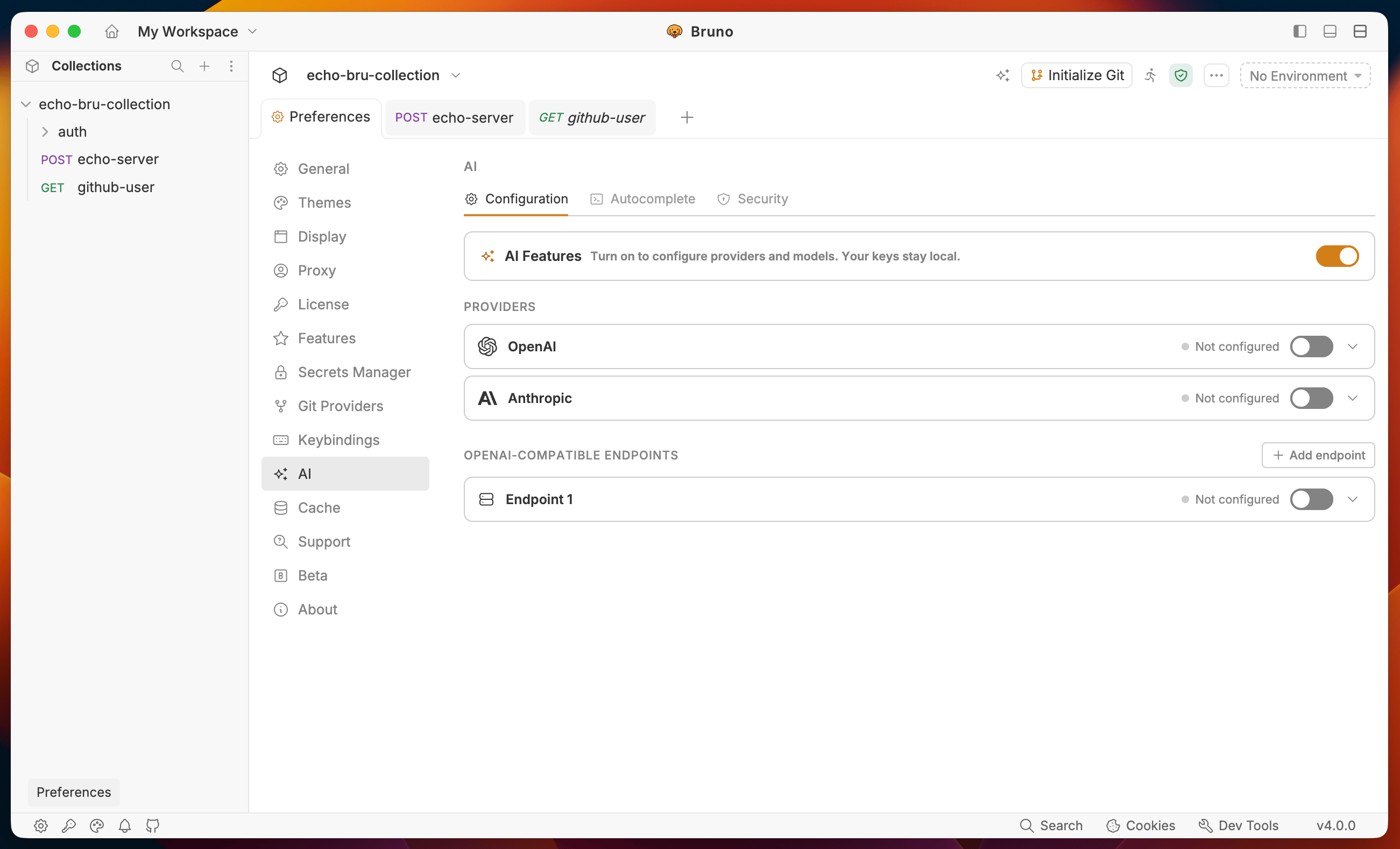
Open **Preferences** from the bottom-left corner of the app and click the **AI** tab. The AI tab has three sections: **Configuration**, **Autocomplete**, and **Security**.
 ***
## Configuration
### Enable AI Features
Toggle **AI Features** on at the top of the Configuration tab. Your API keys are stored locally in `preference.json` and never leave your machine.
### Add a provider
#### OpenAI
1. Expand the **OpenAI** row under **Providers**.
2. Enter your **API Key**.
3. Enable or disable individual models as needed.
4. Toggle the provider on.
#### Anthropic
1. Expand the **Anthropic** row under **Providers**.
2. Enter your **API Key**.
3. Choose from the default models: **Claude Opus 4.7**, **Claude Sonnet 4.6**, **Claude Haiku 4.5**.
4. Toggle the provider on.
#### Custom OpenAI-compatible endpoints
Connect any provider that exposes an OpenAI-compatible API — including self-hosted models like Llama or any third-party proxy.
1. Click **+ Add endpoint** under **OpenAI-Compatible Endpoints**.
2. Fill in:
* **Name** - a label for this endpoint
* **Base URL** - the API base URL (for example `https://api.example.com/v1`)
* **API Key** - your key for this endpoint
3. Add model IDs under **Models** - use the model ID your provider expects (for example `gpt-4o`, `llama3.1:8b`, or `mistral-7b`). You can also add a label for each model.
4. Click **Save**.
You can add multiple custom endpoints. Each is stored as a separate provider entry in `preference.json`.
***
## Autocomplete
### Enable Autocomplete
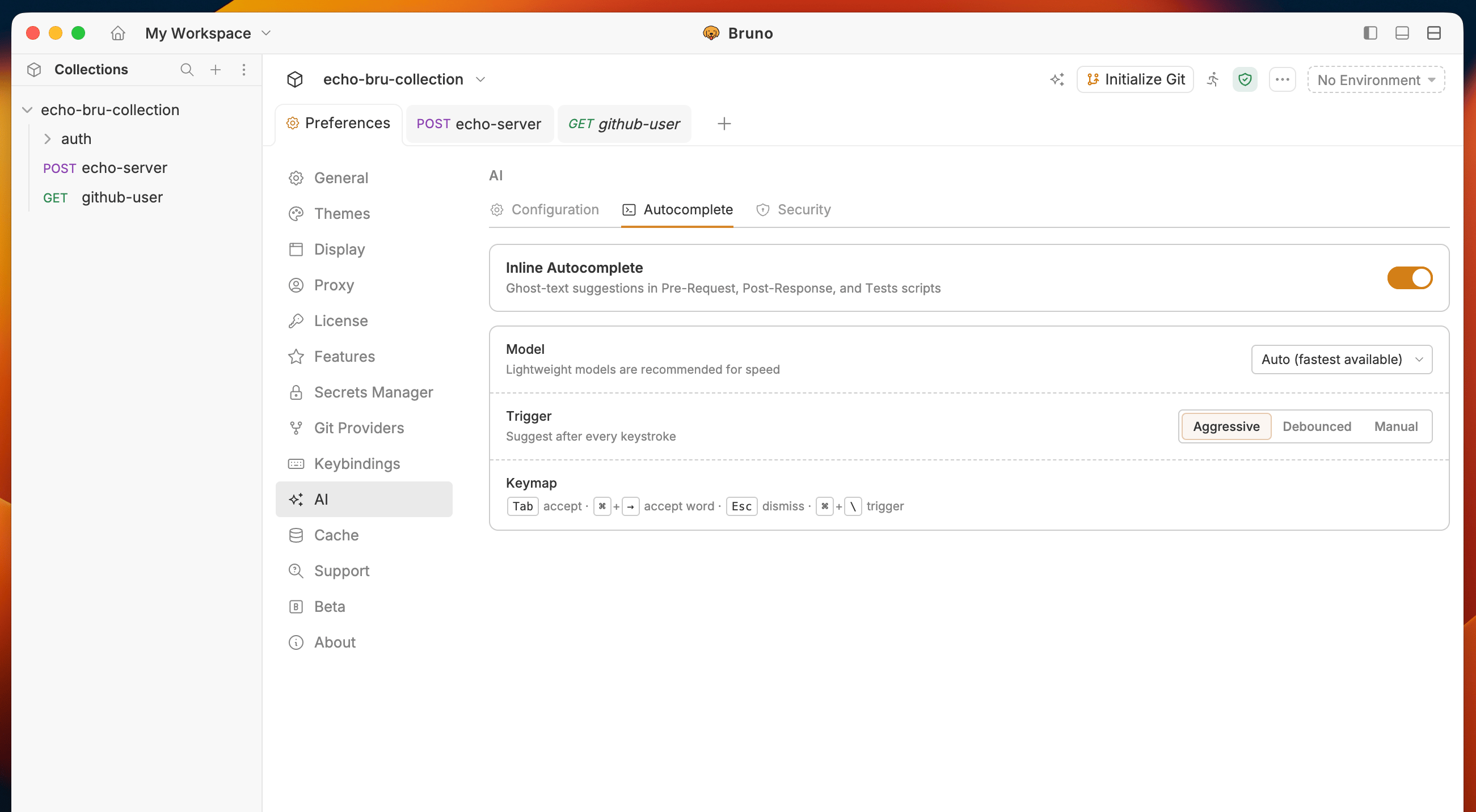
Toggle **Inline Autocomplete** on to activate ghost-text suggestions in script and test editors.
***
## Configuration
### Enable AI Features
Toggle **AI Features** on at the top of the Configuration tab. Your API keys are stored locally in `preference.json` and never leave your machine.
### Add a provider
#### OpenAI
1. Expand the **OpenAI** row under **Providers**.
2. Enter your **API Key**.
3. Enable or disable individual models as needed.
4. Toggle the provider on.
#### Anthropic
1. Expand the **Anthropic** row under **Providers**.
2. Enter your **API Key**.
3. Choose from the default models: **Claude Opus 4.7**, **Claude Sonnet 4.6**, **Claude Haiku 4.5**.
4. Toggle the provider on.
#### Custom OpenAI-compatible endpoints
Connect any provider that exposes an OpenAI-compatible API — including self-hosted models like Llama or any third-party proxy.
1. Click **+ Add endpoint** under **OpenAI-Compatible Endpoints**.
2. Fill in:
* **Name** - a label for this endpoint
* **Base URL** - the API base URL (for example `https://api.example.com/v1`)
* **API Key** - your key for this endpoint
3. Add model IDs under **Models** - use the model ID your provider expects (for example `gpt-4o`, `llama3.1:8b`, or `mistral-7b`). You can also add a label for each model.
4. Click **Save**.
You can add multiple custom endpoints. Each is stored as a separate provider entry in `preference.json`.
***
## Autocomplete
### Enable Autocomplete
Toggle **Inline Autocomplete** on to activate ghost-text suggestions in script and test editors.
 ### Model
Select which model handles suggestions. **Auto (fastest available)** picks the lightest model from your active providers and is recommended for keeping suggestions fast.
### Trigger mode
| Mode | Behavior |
| ---------- | ----------------------------------------- |
| Aggressive | Suggests on every keystroke |
| Debounced | Suggests after you pause typing (default) |
| Manual | Only suggests when you press `⌘ \` |
### Keymap
| Key | Action |
| ----- | -------------------------- |
| `Tab` | Accept the full suggestion |
| `⌘ →` | Accept one word at a time |
| `Esc` | Dismiss the suggestion |
| `⌘ \` | Trigger manually |
***
## Security
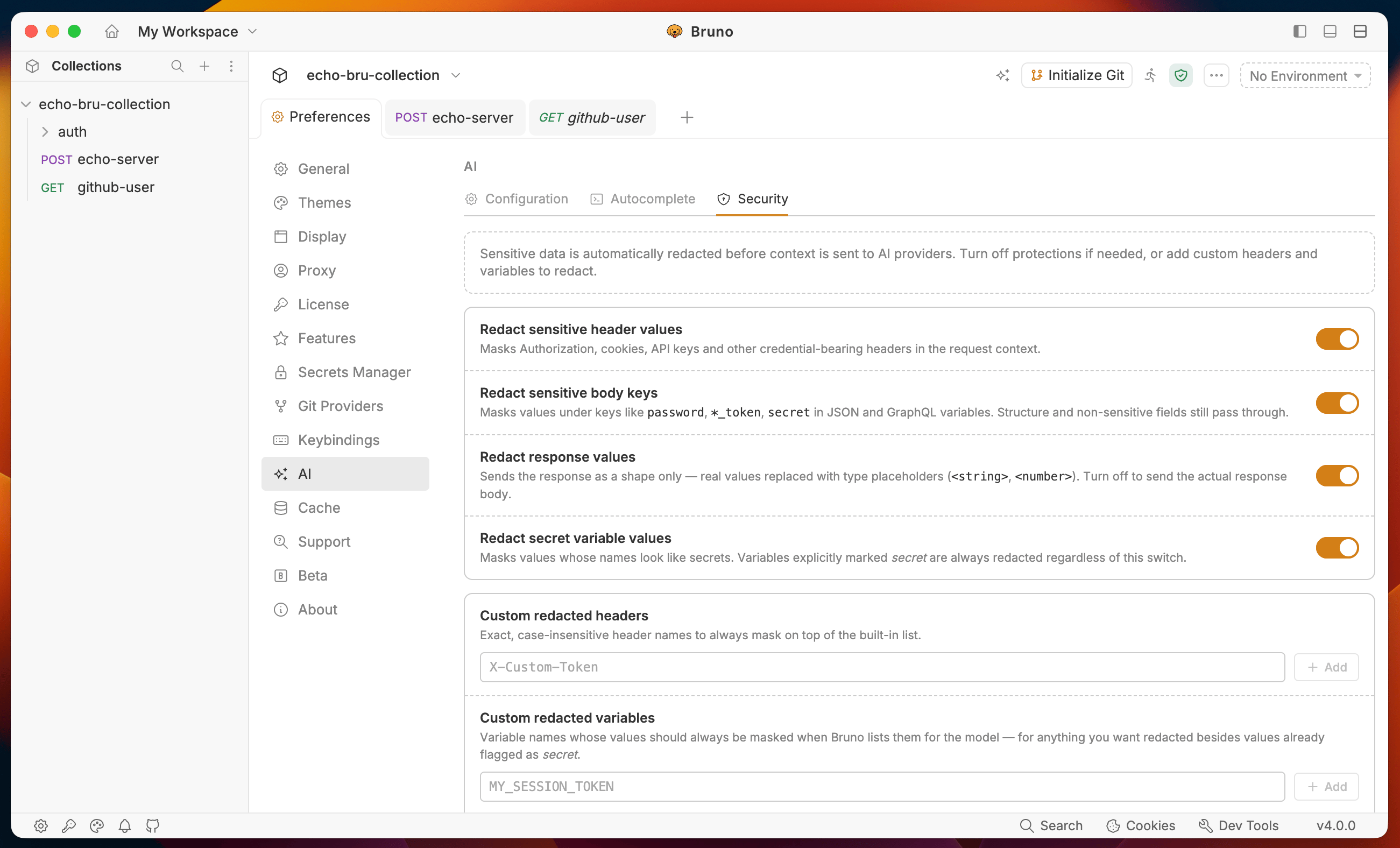
Bruno automatically redacts sensitive data before sending context to any provider. All protections are on by default.
### Model
Select which model handles suggestions. **Auto (fastest available)** picks the lightest model from your active providers and is recommended for keeping suggestions fast.
### Trigger mode
| Mode | Behavior |
| ---------- | ----------------------------------------- |
| Aggressive | Suggests on every keystroke |
| Debounced | Suggests after you pause typing (default) |
| Manual | Only suggests when you press `⌘ \` |
### Keymap
| Key | Action |
| ----- | -------------------------- |
| `Tab` | Accept the full suggestion |
| `⌘ →` | Accept one word at a time |
| `Esc` | Dismiss the suggestion |
| `⌘ \` | Trigger manually |
***
## Security
Bruno automatically redacts sensitive data before sending context to any provider. All protections are on by default.
 ### Redact sensitive header values
Masks `Authorization`, cookies, API keys, and other credential-bearing headers. Non-sensitive headers pass through unchanged.
**Request headers sent to Bruno:**
```
Authorization: Bearer eyJhbGci...
Content-Type: application/json
X-Request-Id: req_abc123
```
**What the AI receives:**
```
Authorization:
Content-Type: application/json
X-Request-Id: req_abc123
```
### Redact sensitive body keys
Masks values under keys like `password`, `*_token`, and `secret` in JSON and GraphQL variables. Structure and non-sensitive fields still pass through.
**Request body sent to Bruno:**
```json theme={null}
{
"username": "usebruno",
"password": "mypassword",
"access_token": "abc123",
"email": "usebruno@example.com"
}
```
**What the AI receives:**
```json theme={null}
{
"username": "usebruno",
"password": "",
"access_token": "",
"email": "usebruno@example.com"
}
```
### Redact response values
Sends the response as a shape only. Real values are replaced with type placeholders. Turn this off to send the actual response body.
**Actual response:**
```json theme={null}
{
"id": 42,
"name": "usebruno",
"token": "eyJhbGci..."
}
```
**What the AI receives:**
```json theme={null}
{
"id": "",
"name": "",
"token": ""
}
```
### Redact secret variable values
Masks values of variables whose names look like secrets. Variables explicitly marked `secret` are always redacted regardless of this toggle.
**Environment variables:**
```
baseUrl = https://api.example.com
api_key = sk-abc123
```
**What the AI receives:**
```
baseUrl = https://api.example.com
api_key =
```
### Custom redacted headers
Add header names to always mask on top of the built-in list. Matching is exact and case-insensitive.
### Custom redacted variables
Add variable names whose values should always be masked when Bruno sends context to the model.
### Covered by default
`Authorization`, `Proxy-Authorization`, `Cookie`, `Set-Cookie`, `X-API-Key`, `X-Auth-Token`, `X-Access-Token`, `X-CSRF-Token`, plus any name matching `token`, `secret`, `password`, or `api_key`.
### Redact sensitive header values
Masks `Authorization`, cookies, API keys, and other credential-bearing headers. Non-sensitive headers pass through unchanged.
**Request headers sent to Bruno:**
```
Authorization: Bearer eyJhbGci...
Content-Type: application/json
X-Request-Id: req_abc123
```
**What the AI receives:**
```
Authorization:
Content-Type: application/json
X-Request-Id: req_abc123
```
### Redact sensitive body keys
Masks values under keys like `password`, `*_token`, and `secret` in JSON and GraphQL variables. Structure and non-sensitive fields still pass through.
**Request body sent to Bruno:**
```json theme={null}
{
"username": "usebruno",
"password": "mypassword",
"access_token": "abc123",
"email": "usebruno@example.com"
}
```
**What the AI receives:**
```json theme={null}
{
"username": "usebruno",
"password": "",
"access_token": "",
"email": "usebruno@example.com"
}
```
### Redact response values
Sends the response as a shape only. Real values are replaced with type placeholders. Turn this off to send the actual response body.
**Actual response:**
```json theme={null}
{
"id": 42,
"name": "usebruno",
"token": "eyJhbGci..."
}
```
**What the AI receives:**
```json theme={null}
{
"id": "",
"name": "",
"token": ""
}
```
### Redact secret variable values
Masks values of variables whose names look like secrets. Variables explicitly marked `secret` are always redacted regardless of this toggle.
**Environment variables:**
```
baseUrl = https://api.example.com
api_key = sk-abc123
```
**What the AI receives:**
```
baseUrl = https://api.example.com
api_key =
```
### Custom redacted headers
Add header names to always mask on top of the built-in list. Matching is exact and case-insensitive.
### Custom redacted variables
Add variable names whose values should always be masked when Bruno sends context to the model.
### Covered by default
`Authorization`, `Proxy-Authorization`, `Cookie`, `Set-Cookie`, `X-API-Key`, `X-Auth-Token`, `X-Access-Token`, `X-CSRF-Token`, plus any name matching `token`, `secret`, `password`, or `api_key`.